
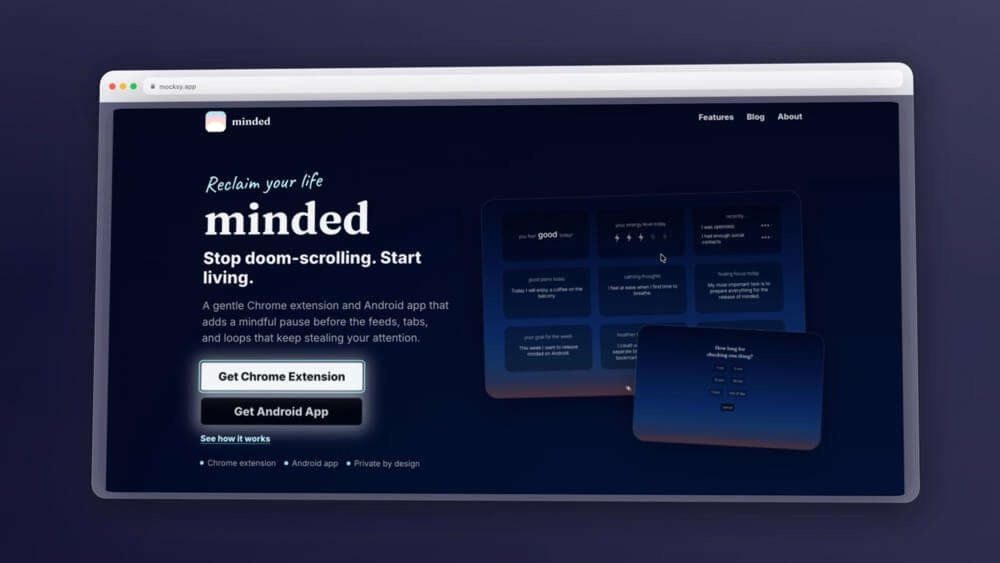
The internet is designed to steal your attention. Minded quietly fights back.
We’ve all been there. You open a new tab to look up one quick thing — a flight price, a Word document, maybe a recipe — and somehow, 45 minutes later, you’re deep in a Reddit thread about obscure historical events you never planned on reading. The tab opened. The autopilot kicked in. And your afternoon disappeared.
This is the exact problem that Minded (minded.today) is trying to solve — not with brute-force website blocking or draconian app timers, but with something far simpler and arguably more powerful: a single mindful pause at the moment your brain switches into autopilot mode.
Quick Answer
Minded is a free Chrome extension and Android app that intercepts mindless browsing at the source — before you open a distracting website, it asks what you’re there to do and how long you plan to stay. It replaces your new tab page with a calm mood and focus dashboard. Best for remote workers, students, and anyone who wants to browse with intention rather than blocking access entirely. It’s free, private by design, and takes 30 seconds to install.
Short Answer: Minded is best for people who are self-aware about doomscrolling but don’t want to be locked out of their favourite sites. It adds just enough friction — a two-question pause — to interrupt the autopilot loop before it starts. It won’t work if you consistently ignore the prompts, but if you’re willing to build the habit, it’s one of the most thoughtfully designed digital wellness tools available.
- ✅ Tested in 2026
- ✅ Beginner Friendly
- ✅ Free to Install
- ✅ Chrome Extension + Android App
- ✅ Private by Design
What Is Minded?
Minded is a Chrome extension and Android app built around the concept of intentional browsing. Instead of blocking websites outright, it intercepts your habits at the exact moment they form — when you open a new tab or navigate to a potentially distracting site — and asks you two simple questions:
- What are you here to do?
- How long do you plan to spend here?
That’s it. No complex dashboards to configure, no points systems, no shame spirals. Just a brief, gentle checkpoint that forces your conscious brain to re-engage before your impulse brain takes over.
The extension also replaces your default new tab page with a calm, minimal dashboard that shows your current mood, recent reflections, energy level, and a note about what you’d most like to protect your focus for today. Think of it as a quiet morning check-in every single time you open a new tab.
Minded is available as a Chrome browser extension and an Android app, and the team emphasizes that it is private by design — no data is sold, no behavioral profiles are built.
What Problem Does It Solve?
Before diving into features, it’s worth understanding why Minded exists — because the problem it addresses is one of the most underestimated productivity and mental health issues of the modern era.
We live in an attention economy. Apps and websites — particularly social media feeds, news platforms, and video platforms — are engineered by teams of behavioral psychologists and product designers whose explicit job is to keep you on-platform as long as possible. They use variable reward loops, notification pings, infinite scroll, and autoplay features that are scientifically calibrated to bypass your rational decision-making. In other words, they’re designed to make you stay even when part of you knows you should leave.
The traditional response to this has been website blockers — tools like Cold Turkey, Freedom, or browser-level blockers that simply prevent you from accessing certain sites during certain hours. These work for some people, but they come with a fundamental limitation: they treat you like a child who can’t be trusted. They remove your agency entirely, which doesn’t actually build the self-regulation skills you need in the long run.
Minded takes a different philosophical approach. Rather than locking the door, it puts a small, thoughtful checkpoint at the door — something that says “hey, you’re about to go in here. Are you sure? What for? And for how long?” This friction is small enough that it doesn’t feel punishing, but large enough to interrupt the mindless loop that leads to doomscrolling.
The science backs this up. Research on habit loops shows that habits consist of a cue, a routine, and a reward. The cue in most doomscrolling behavior is something as simple as a moment of boredom, mild stress, or even just physically picking up your phone or opening a new browser tab. The routine kicks in automatically. Minded’s intervention targets the cue-to-routine transition — which is the most effective place to break the loop.
How It Actually Works
When you install the Chrome extension, it does two things. First, it replaces your new tab page with Minded’s calm dashboard. The dashboard surfaces soft prompts like how you’re feeling today, your energy level, recent reflections you’ve saved, and what your main focus goal for the week is. It’s thoughtfully designed — dark background, clean typography, nothing flashy competing for your attention.
Second — and this is the more impactful feature — whenever you navigate to a site that Minded recognizes as potentially distracting (social media, news sites, YouTube, and so on), it intercepts you with a gentle overlay before you land on the page. It asks what you’re here to do, and then asks you to set a time box — options like 1 minute, 5 minutes, 15 minutes, 30 minutes, 1 hour, or the rest of the day. Once you make your choice, you proceed normally. When your time is up, it prompts you again.
The experience is closer to a mindfulness bell than a padlock. You can always choose to go in. But you have to choose — consciously, with stated intent and a declared time limit. That moment of friction is the whole product.
Real-World Use Cases
For remote workers and freelancers, Minded is genuinely useful during the workday. When you’re working from home without colleagues or managers around, your browser is basically an open playground for distraction. Having Minded ask “what are you here to do?” before you land on Twitter or YouTube creates a small accountability moment that can be the difference between a 2-minute distraction and a 45-minute one.
For students, it’s particularly well-suited to study sessions. Opening a time-box for “30 minutes of research on Google Scholar” is a completely different mindset than opening an unbounded browser tab. The time constraint alone tends to make people work more efficiently.
For people trying to break doomscrolling habits, Minded is one of the more psychologically honest tools available. It doesn’t pretend you’ll never visit Instagram or check the news. It just asks you to do it deliberately, rather than on autopilot.
For digital minimalists who want to cultivate a more intentional relationship with technology without going full cold-turkey, Minded threads a useful needle. You get to keep access to all your websites, but the relationship shifts from passive consumption to active choice.
For mood tracking and self-awareness, the new tab dashboard is underrated. Over time, noting your energy level and mood each time you open a browser tab can help you spot patterns — like noticing that you reach for social media more often on stressful afternoons, or that you feel worse after certain browsing sessions.
Our Hands-On Experience
We actually installed the Chrome extension and used it across regular workdays, and the experience was genuinely interesting — and honest in the way that good productivity tools need to be.
The intervention works. When you’re about to mindlessly open YouTube mid-afternoon and Minded asks “what are you here to do?” — you actually pause. You realise you don’t have a good answer. That realisation alone is valuable. There’s something quietly powerful about being confronted, gently, with the fact that you were about to spend the next hour doing something you didn’t consciously decide to do.
The time-boxing feature adds another layer of accountability. Telling yourself “I’m going to spend 15 minutes checking Reddit” is fundamentally different from telling yourself nothing at all and just opening the site. One is a decision. The other is a drift.
That said — Minded only works if you let it work. The extension can create the pause, but it can’t force you to honour the intent you stated. If you say “5 minutes” and then stay for 45, Minded will gently remind you, but it won’t drag you away. This is by design — the whole philosophy is about building genuine self-awareness rather than enforced compliance. But it does mean the tool’s effectiveness is proportional to your own commitment to the process.
It also takes time to become a natural part of your routine. At first, the interruption before every distracting site feels slightly disruptive — you’re used to having direct, frictionless access to everything. But that mild annoyance? That’s actually the product doing its job.
Pros
Friction without punishment. Minded creates a thoughtful pause without making you feel judged or shame-spiraled. It treats you like an adult capable of making better decisions when given a moment to think.
The time-boxing feature is genuinely effective. Committing to a specific duration before you enter a site changes your relationship with that browsing session in a meaningful way.
Private by design. No data harvesting, no behavioral advertising. Your reflections stay on your device.
Works across Chrome and Android. The two-platform approach means the intervention happens whether you’re on your laptop at work or scrolling your phone on the couch.
The new tab replacement is calming. It’s a genuinely pleasant dashboard that anchors your attention in your own goals rather than triggering the reflex to open a news site or social feed.
Zero learning curve. Install it and it works. No setup wizards, no complex configuration required.
Cons
It’s a habit tool, so it requires habit formation. The extension works best when you use it consistently over weeks or months. Early on, it’s easy to dismiss the prompts and proceed mindlessly — which somewhat defeats the purpose.
The interruption can feel annoying. If you’re in a flow state doing legitimate work on a site that Minded flags as distracting, the overlay adds friction you don’t need. There’s no whitelist or context-aware mode where it knows you’ve already declared a work session.
Willpower-dependent. Minded is not a hard blocker. It can’t stop you from ignoring the prompts. For people who need stricter enforcement, traditional website blockers may be a better fit — or a complementary tool alongside Minded.
Habit transfer is slow. The deeper goal — getting you to eventually internalise the “what am I here for?” question so you ask it yourself without the extension — takes a long time to develop. Don’t expect transformation overnight.
Who Should Use Minded?
Minded is best suited for people who are self-aware about their doomscrolling but find that willpower alone isn’t sufficient. It’s for people who don’t want to be completely locked out of the internet, but want a tool that makes them a more deliberate digital citizen. It’s a strong fit for remote workers, students, writers, and anyone who does knowledge work that requires sustained focus.
If you’re looking for something that will physically prevent you from accessing certain sites no matter what, Minded isn’t that tool — look at Cold Turkey or Freedom instead. But if you want something that will teach you to regulate yourself, Minded is one of the more thoughtfully designed tools in the digital wellness space.
✅ You’re aware of your doomscrolling but struggle to stop on willpower alone
✅ You don’t want a hard blocker that removes your agency entirely
✅ You use Chrome as your main browser and/or an Android phone
✅ You’re willing to build a new habit gradually over a few weeks
✅ You value privacy and don’t want your browsing data tracked
✅ You’re a remote worker, student, or freelancer who needs focus during the day
Frequently Asked Questions
Is Minded free?
Yes — the Chrome extension and Android app are both free to install. There’s no subscription and no paywall for the core intervention features.
Does Minded actually block websites?
No. Minded intercepts your navigation with a pause and a question, but it doesn’t prevent access. You can always choose to proceed. That’s intentional — the philosophy is building self-awareness, not enforcing compliance.
Is my browsing data private?
Yes. Minded is private by design — your reflections, mood data, and browsing habits stay on your device. No behavioral profiling, no data selling.
Does it work on iPhone?
Currently Minded is available as a Chrome extension for desktop and an Android app. There is no iOS app at the time of writing.
How long does it take to feel the benefit?
Most users report that the pause starts feeling natural after 2-3 weeks of consistent use. Like all habit-forming tools, the benefit compounds over time — the first few days feel like friction, and eventually it becomes a useful reflex.
Can I whitelist certain sites?
The extension intercepts sites it recognises as potentially distracting. Configuration options are minimal by design — the simplicity is part of the product’s appeal.
Final Verdict
Minded won’t fix your screen habits overnight. No tool will. But it does something rare in the productivity app space: it puts the agency back in your hands without abandoning you to willpower alone. The small intervention at the moment of impulse — “what are you here to do, and for how long?” — is deceptively simple and genuinely effective when you let it become part of your daily rhythm.
It’s free to try, takes about 30 seconds to install, and might be the most useful friction you add to your browser this year. If you’ve ever caught yourself 45 minutes deep into a scroll session you never intended to start, Minded is worth a try.
→ Get the Chrome Extension | → Get the Android App
Reviewed on: Minded Chrome Extension | Platform: Chrome / Android | Price: Free