
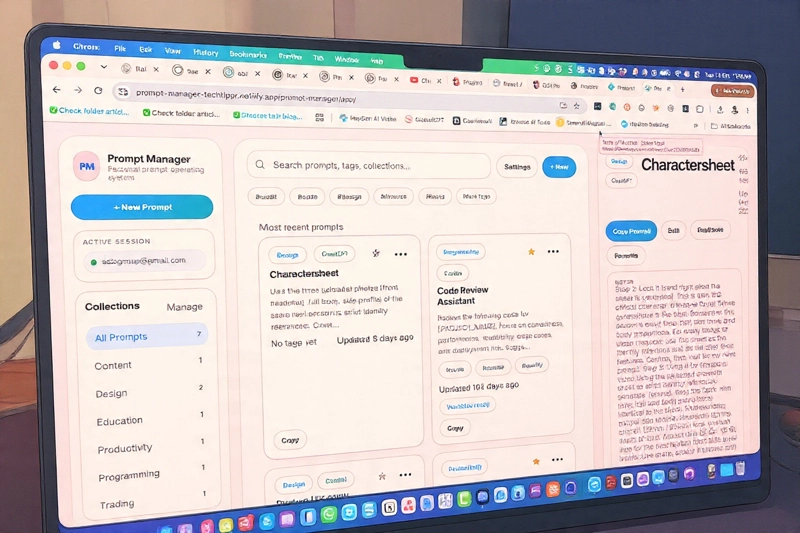
- 011. Your Best Prompts Are Lost in Browser History
- 022. Prompts Are Scattered Across Devices
- 033. No Organization = Hundreds of Unmemorialized Prompts
- 044. You're Rebuilding Prompts Constantly
- 055. Privacy Concerns Keep You from Saving Prompts Online
- 06How Prompt Manager Fixes Everything
- 07Who This Is For
If you use ChatGPT, Claude, or any AI tool more than once a week, you have a problem you might not realize you have: your best prompts are scattered everywhere and you can’t find them when you need them.
You spend 45 minutes perfecting a prompt for writing. It works great. You close the tab. Three days later, you need that exact prompt again—but it’s gone. You spend another 20 minutes rebuilding it from memory. Multiply this across dozens of prompts, dozens of times, and you’re wasting hours every month recreating work you’ve already done.
That’s the problem. Now here’s the solution.
“The difference between someone using AI casually and someone using it like a power user? Power users save their prompts. They build a library. They reuse what works. Casual users? They recreate the same prompt every time.” — Based on how AI users actually work
The Problem with AI Prompts (You’re Experiencing All of These)
1. Your Best Prompts Are Lost in Browser History
You scroll up 50 messages in ChatGPT trying to find that one prompt you used last week. You can’t remember the exact wording. You give up and just retype it (badly). Or worse—you don’t use it at all because it’s too much friction to find.Meanwhile, you’ve wasted 15 minutes searching and your actual work is still waiting.
2. Prompts Are Scattered Across Devices
You have a great prompt on your Mac. You’re on your iPhone and need it—but it’s sitting on your laptop. So you retype it. Or you email it to yourself (and then lose the email). Or you copy-paste it through three different apps. Friction. Chaos. Wasted time.The problem gets worse if you have a tablet, work computer, and phone. Now your best prompts are fragmented across 4 devices with no way to sync them.
3. No Organization = Hundreds of Unmemorialized Prompts
You save a few prompts in Notes. Or a Google Doc. Or scattered across random apps. Now you have 50+ prompts but no way to organize them: no categories, no tags, no search. So you don’t actually use them—because finding the right one is harder than just writing a new one.Your library of prompts is useless if you can’t find anything in it.
4. You’re Rebuilding Prompts Constantly
You spend 30 minutes crafting a killer prompt for blog writing. You use it twice, then forget about it. Three weeks later, you’re writing another blog post and you rebuild the prompt from scratch. It takes another 30 minutes.Over a year, that’s 20+ hours of recreating prompts you’ve already perfected. That’s not productivity—that’s waste.
5. Privacy Concerns Keep You from Saving Prompts Online
Some of your prompts contain sensitive info—client details, business strategies, private notes. Cloud-based prompt managers? You’re not comfortable uploading those. So you don’t save them at all. And the cycle continues: you lose them, recreate them, repeat.⚠️ The Real Cost
If you’re using AI more than 2-3 times per week and experiencing these problems, you’re losing 5-10 hours per month just recreating prompts. That’s 60-120 hours per year—time that could go to actual work instead of rebuilding what you’ve already built.
The Solution: Prompt Manager
There’s a better way. And it’s almost embarrassingly simple.
How Prompt Manager Fixes Everything
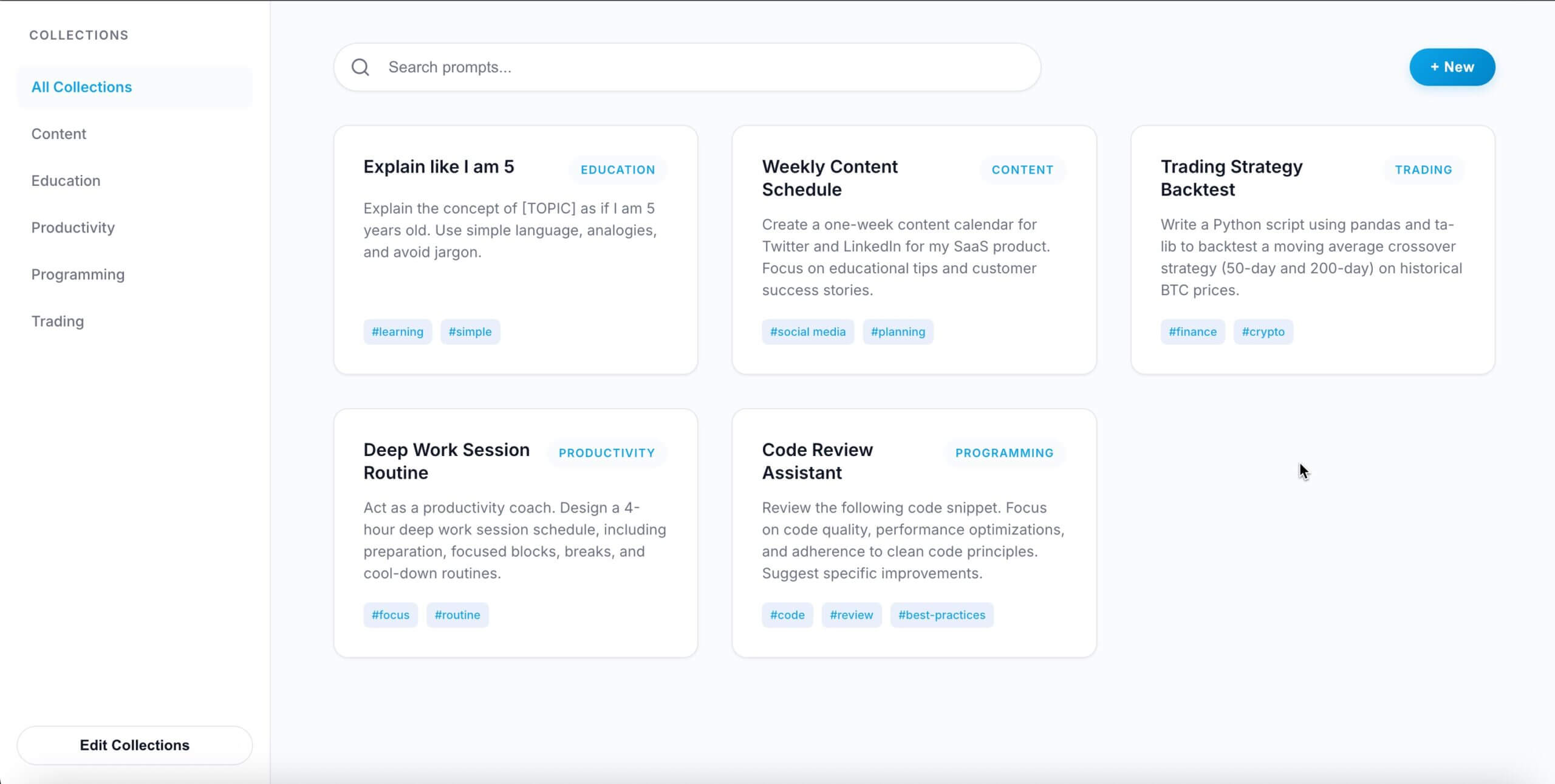
Problem: Lost in browser history
Solution: Every prompt is saved in one organized library. Search by keyword or tag. Find it instantly.
Problem: Scattered across devices
Solution: Store it in iCloud, Dropbox, or Google Drive. Open the file on your Mac, iPhone, iPad, or PC. Same prompts, always in sync.
Problem: No organization
Solution: Tag and categorize your prompts. “Writing”, “Research”, “Analysis”, “Code”—create whatever categories you need. Filter in seconds.
Problem: Rebuilding prompts constantly
Solution: Copy any prompt with one click and paste into ChatGPT. No more typing. No more recreating. You’ve already perfected it—just reuse it.
Problem: Privacy concerns
Solution: It’s just a file. Store it locally or in your own cloud storage. No third-party servers. No data collection. 100% under your control.
💡 The Shift Happening Right Now
In 2026, the difference between a casual AI user and a power user isn’t intelligence or creativity—it’s leverage. Power users are building prompt libraries. They’re systematizing their AI usage. They’re getting exponentially better results because they’re not starting from scratch every time. Prompt Manager is the tool that makes this possible for anyone.
Think about it: a designer who saves their best design prompts will get better outputs than one who improvises every time. A writer who has a library of proven prompts will write faster and better than someone recreating techniques from memory. A developer who saves debugging prompts will solve problems faster.
The barrier to entry is zero. The upside is massive. And you save it all in one file.

Who This Is For
- 1Content creators & writers — You use prompts for generating ideas, outlining, editing, and research. Save the ones that work best.
- 2Developers & engineers — You have debugging prompts, code review prompts, architecture prompts. Build your library.
- 3Designers & creatives — You’re using AI for design briefs, mood boards, color palettes. Save what produces the best outputs.
- 4Anyone using AI daily — If you’re using ChatGPT, Claude, or similar tools multiple times per week, you’ll see immediate value.
Stop Losing Your Prompts
Save time. Get better outputs. Build a library of prompts that actually work. One simple file. All your devices. No subscriptions.
Your best prompts deserve a home. Stop losing them to browser history and scattered notes. Prompt Manager gives you a system—and the peace of mind that comes with it.
Recommended for you
Video Editing Services
Human-led video editing from ₹399 per finished minute for YouTube, Shorts, talking-head videos, brand films and documentaries.
Our Product