
Both Chromecast and Roku plug into your TV’s HDMI port and stream content. But they work completely differently — and the right one depends on how you watch TV. Here’s a plain comparison.
Short Answer: Roku is better if you want a standalone remote-based experience with a single interface for all streaming apps. Chromecast with Google TV is better if you use Android/Google services heavily and want to ‘cast’ content from your phone. Budget pick: Roku Express (~₹3,000/$30) vs Chromecast with Google TV (~₹4,500/$50).
How They Work — The Key Difference
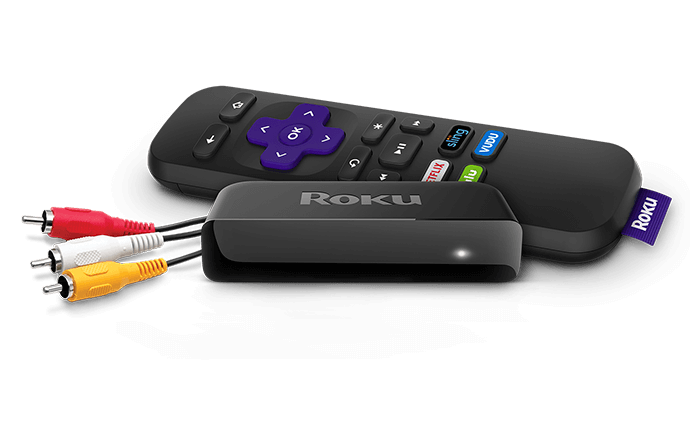
Roku operates like a mini smart TV. You navigate with a physical remote, browse a home screen, and open apps (Netflix, Prime Video, Disney+, YouTube) directly on the device. No phone required.
Chromecast (the basic version) works differently — your phone or laptop sends content to the TV. You control playback from your phone. The newer Chromecast with Google TV adds a remote and a traditional interface, making it much closer to Roku in use.
Roku — Best For
- People who want a simple, remote-controlled experience
- Households with mixed devices (not just Android/Google)
- Those who want to access free ad-supported TV (Roku has its own free channel called The Roku Channel)
- Budget buyers (the Roku Express is one of the cheapest capable streamers available)
Roku Strengths
The Roku interface is clean and neutral — it doesn’t push you toward any particular streaming service. The Roku Channel has hundreds of free TV shows and movies. Roku also has excellent universal search that searches across all your streaming apps at once to find where a title is available.
It works with Alexa, Google Assistant, and Apple AirPlay 2 (on higher-end models), making it flexible across ecosystems.
Roku Weaknesses
The home screen shows ads. The cheaper models are limited to 1080p — you’ll need the Roku Streaming Stick 4K or Ultra for 4K/HDR content. No built-in Chromecast support.
Chromecast with Google TV — Best For
- Android phone users who want deep Google integration
- People already using Google services (YouTube, Google Play Movies, Google TV app)
- Those who want voice search via Google Assistant
- Users who want to cast directly from Chrome browser or Android apps
Chromecast Strengths
The Google TV interface is slick and personalised — it recommends content across all your apps in one feed. Google Assistant voice search is excellent. Casting from any Android app that supports it (most do) is seamless. The 4K version supports Dolby Vision and Dolby Atmos.
Chromecast Weaknesses
The original Chromecast (without Google TV) has no remote and is phone-dependent — if your phone battery dies, your TV controls go with it. The Google TV interface can feel overwhelming with too many recommendations. Less useful on iOS/Apple devices compared to Roku + AirPlay.
Quick guide:
Want simple remote-controlled TV? → Roku Express | Use Android + Google services heavily? → Chromecast with Google TV | Budget under ₹3000/$30? → Roku Express
Price Comparison (2026)
- Roku Express — ~₹3,000 / $30 — 1080p, basic remote
- Roku Streaming Stick 4K — ~₹5,500 / $50 — 4K, voice remote
- Roku Ultra — ~₹8,500 / $100 — 4K, Dolby Vision, lost remote finder
- Chromecast HD (basic) — ~₹3,500 / $30 — 1080p, no remote
- Chromecast with Google TV (4K) — ~₹5,500 / $50 — 4K, voice remote
What About Amazon Fire TV?
Fire TV Stick is a third option worth considering, especially if you’re a heavy Amazon Prime Video user. It’s more Amazon-centric than the other two, but covers all major streaming apps and is competitively priced. See our separate Fire TV comparison guide for details.
Warning: Basic Chromecast (without Google TV) requires your phone to be on and nearby to control playback. If you want a standalone experience, make sure you’re buying Chromecast with Google TV, not the basic model.
Quick checklist:
- ✅ Decided between Roku (remote-first) vs Chromecast (phone/Google-first)
- ✅ Checked whether 4K TV needs a 4K streamer (Roku Streaming Stick 4K or Chromecast 4K)
- ✅ Verified TV has an available HDMI port
- ✅ Confirmed which streaming services you need — all major ones are on both
Frequently Asked Questions
Can Chromecast replace a smart TV?
Yes. Plug it into any TV with an HDMI input and a power source (USB from the TV or a wall adapter). Chromecast with Google TV turns any TV into a full smart TV with apps and voice search.
Do Roku or Chromecast need a subscription?
No subscription to use the hardware. You’ll need subscriptions to individual services (Netflix, Prime Video, etc.) but the Roku and Chromecast devices themselves have no monthly fee. Roku also has free ad-supported content via The Roku Channel.
Does Chromecast work with iPhone?
Basic casting from iPhone works with some apps (YouTube, Netflix, etc.) but it’s not as smooth as Android. Roku is a better choice for iOS users because of its AirPlay 2 support on newer models.
Which is better for gaming?
Neither is designed for gaming. The Chromecast can run Google’s cloud gaming service (formerly Stadia, now through other platforms) but input lag makes most games unplayable. For gaming, a console or dedicated cloud gaming device is a better investment.
Conclusion
If you want the simplest, most universal experience, buy a Roku Express or Roku Streaming Stick 4K. If you’re an Android/Google household, Chromecast with Google TV is the smarter pick. The basic Chromecast (no remote) is only worth it if you specifically want phone-controlled casting.
Looking for more recommendations? See our best tech gadgets guide or our review of the best streaming devices.
Check Roku Prices ↗ ↗Check Chromecast Prices