

- 01What is an AI prompt library?
- 02Why bloggers and creators need a prompt library
- 03The best AI prompt library structure
- 041. Blogging and SEO prompt library
- 052. Social media prompt library
- 063. YouTube and video prompt library
- 074. Email and newsletter prompt library
- 085. Marketing and sales prompt library
- 096. Design and visual prompt library
- 107. Research and strategy prompt library
- 118. Productivity prompt library
- 12How to store your AI prompt library
- 13Where Prompt Manager fits in
- 14How to build your first prompt library in 30 minutes
- 15Prompt library checklist for creators
- 16Common mistakes when building an AI prompt library
- 17FAQ
- 18Final thoughts
If you are a blogger, creator, marketer, YouTuber, newsletter writer, affiliate publisher, or solo business owner, you probably use AI for more than one thing.
One day you ask ChatGPT to create a blog outline. Next day you use Claude to rewrite a landing page. Then you ask Gemini for content ideas, use an image AI tool for thumbnails, and maybe ask Codex to help with a small tool or website improvement.
The problem is not that AI cannot help.
The problem is that your best prompts are scattered everywhere.
You might have a few prompts saved in Notes, some in old ChatGPT chats, some inside Notion, some bookmarked from Twitter/X, and some you keep rewriting from memory every time.
That is why every serious AI user needs a prompt library.
Short Answer: An AI prompt library is a saved collection of reusable prompts for your regular work — blog posts, SEO, social media, email, YouTube scripts, landing pages, product descriptions, research, and productivity. Instead of rewriting the same AI instructions again and again, you save your best prompts with categories, tags, variables, and notes so you can reuse them quickly.
What is an AI prompt library?
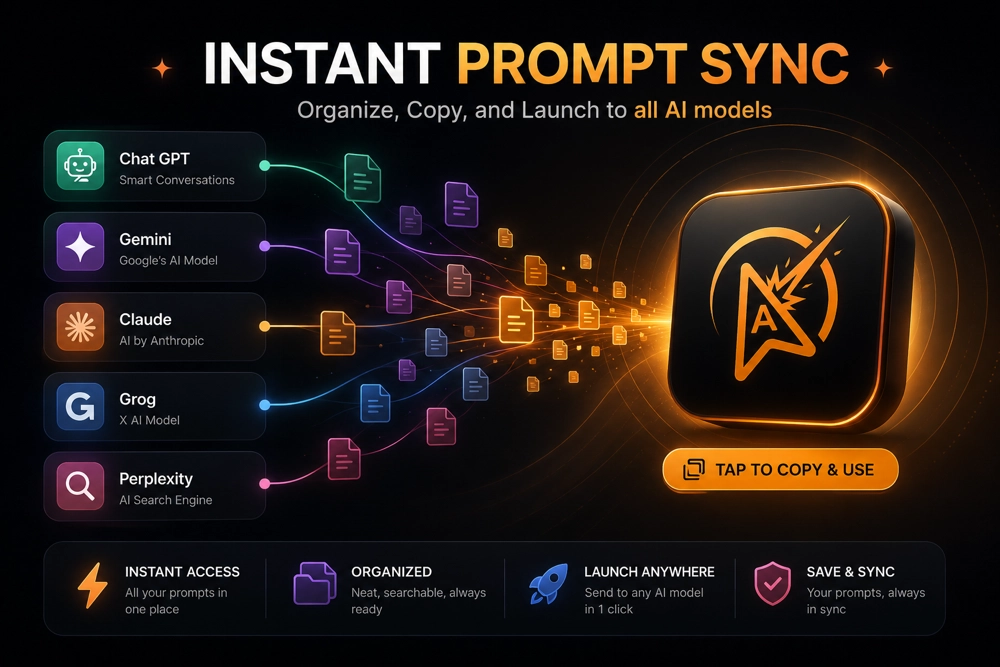
An AI prompt library is a structured collection of prompts you can reuse.
Think of it like a swipe file, but for AI instructions.
Instead of saving random prompts in a document, a proper prompt library helps you organize prompts by:
- Use case — blogging, SEO, social media, email, video, ads, research
- AI tool — ChatGPT, Claude, Gemini, Codex, Midjourney, Image AI
- Tags — #outline, #rewrite, #caption, #affiliate, #landing-page
- Variables — placeholders like [TOPIC], [AUDIENCE], [PRODUCT], [STYLE]
- Favorites — your daily-use prompts
A prompt library is not just a list of prompts.
It is a workflow system.
Simple rule: If you use the same type of prompt more than twice, it deserves a place in your prompt library.
Why bloggers and creators need a prompt library
Creators repeat a lot of work.
A blogger repeatedly needs outlines, titles, intros, FAQs, meta descriptions, comparison tables, internal links, and social posts.
A YouTuber repeatedly needs video ideas, hooks, scripts, titles, descriptions, chapters, and shorts.
A marketer repeatedly needs landing page copy, ad angles, email sequences, audience research, product positioning, and campaign ideas.
If you use AI without a system, every task starts from zero.
With a prompt library, your best instructions are ready whenever you need them.
Without a prompt library
- You rewrite the same prompt again and again.
- You lose the prompt that worked best.
- You waste time searching old chats.
- Your outputs become inconsistent.
- You collect prompt lists but do not actually use them.
With a prompt library
- You reuse proven prompts.
- You get more consistent AI outputs.
- You save time on repetitive content tasks.
- You improve prompts over time.
- You build your own AI workflow system.
Important: The goal is not to collect 500 random prompts. The goal is to save the 30–50 prompts that actually help you create, publish, sell, research, and grow faster.
Related: How to Use AI to Write Blog Posts 5x Faster
The best AI prompt library structure
A useful creator prompt library should be simple.Start with these collections:
- Blogging and SEO
- Social Media
- YouTube and Video
- Email and Newsletter
- Marketing and Sales
- Design and Visuals
- Research and Strategy
- Productivity
You can always add more later, but do not overcomplicate the system in the beginning.
1. Blogging and SEO prompt library
If you publish blog posts, this should be your first collection.Blogging has many repeatable tasks, which makes it perfect for saved prompts.
Prompts to save in this collection
- Keyword research prompt
- Search intent analysis prompt
- Blog post outline prompt
- Introduction writer prompt
- Short answer / featured snippet prompt
- FAQ generator prompt
- Comparison table prompt
- Meta title and description prompt
- Internal linking prompt
- Content refresh prompt
Blog post outline prompt
Create a detailed blog post outline for [TOPIC].

Target audience: [AUDIENCE]
Search intent: [SEARCH INTENT]
Primary keyword: [KEYWORD]
Goal of the article: [GOAL]

Include:
- SEO-friendly H1
- H2 and H3 structure
- short answer section
- examples
- comparison table ideas
- FAQ section
- internal linking suggestions
- final CTA

Make the outline helpful, practical, and easy to scan.
SEO title and meta description prompt
Give me 10 SEO-friendly title options and 5 meta description options for this article.

Article topic: [TOPIC]
Primary keyword: [KEYWORD]
Target audience: [AUDIENCE]

Requirements:
- Keep the keyword near the beginning of the title where natural
- Make the title click-worthy but not clickbait
- Keep meta descriptions short, clear, and benefit-focused
- Include the main user benefit
Internal linking prompt
Suggest internal links for this article.

Article topic: [TOPIC]
Main keyword: [KEYWORD]
Website niche: [NICHE]

Find places where I can naturally link to:
- related tutorials
- product pages
- comparison articles
- beginner guides
- tools or resources

Return anchor text suggestions and where to place them.
Related: How to Organize ChatGPT Prompts
2. Social media prompt library
Social media is one of the best places to use saved AI prompts because the formats repeat daily.A creator may need hooks, captions, threads, carousels, short posts, long posts, and repurposed versions of the same content.
Prompts to save in this collection
- LinkedIn post prompt
- Twitter/X thread prompt
- Instagram caption prompt
- Carousel outline prompt
- Short video hook prompt
- Content repurposing prompt
- Personal story post prompt
- Product launch post prompt
Content repurposing prompt
Repurpose this content into multiple social media posts.

Original content:
[PASTE CONTENT]

Create:
1. A LinkedIn post
2. A Twitter/X thread
3. An Instagram caption
4. A short video script
5. A newsletter intro

Target audience: [AUDIENCE]
Tone: [TONE]
Goal: [GOAL]

Make each version platform-native, not copied and pasted.
LinkedIn post prompt
Write a LinkedIn post about [TOPIC].

Audience: [AUDIENCE]
Tone: practical, clear, and slightly personal
Goal: [GOAL]

Structure:
- strong opening hook
- short personal or practical context
- 3–5 useful points
- simple takeaway
- soft call-to-action

Keep it easy to read with short paragraphs.
Creator tip: Save separate prompts for each platform. A good LinkedIn post, Instagram caption, and Twitter/X thread should not sound exactly the same.
3. YouTube and video prompt library
If you create videos, your prompt library can speed up planning, scripting, hooks, titles, thumbnails, descriptions, and shorts.Prompts to save in this collection
- YouTube video idea prompt
- Video hook prompt
- Full script prompt
- Shorts/Reels script prompt
- Thumbnail idea prompt
- YouTube title prompt
- Description and chapters prompt
- Video repurposing prompt
YouTube video script prompt
Create a YouTube video script for [TOPIC].

Target audience: [AUDIENCE]
Video length: [LENGTH]
Goal: [GOAL]
Tone: [TONE]

Structure:
- opening hook
- problem setup
- main explanation
- examples
- practical steps
- recap
- call-to-action

Make the script conversational and easy to speak.
Thumbnail idea prompt
Give me 10 YouTube thumbnail ideas for this video.

Video topic: [TOPIC]
Target viewer: [AUDIENCE]
Main emotion to trigger: [EMOTION]
Style preference: [STYLE]

For each idea, include:
- thumbnail text
- visual concept
- background idea
- main object/person placement
- why it may get clicks
4. Email and newsletter prompt library
Email is another repeatable content format.A creator or marketer may regularly need newsletter intros, launch emails, welcome sequences, follow-ups, subject lines, and product updates.
Prompts to save in this collection
- Newsletter intro prompt
- Email subject line prompt
- Welcome email prompt
- Product launch email prompt
- Follow-up email prompt
- Re-engagement email prompt
- Weekly digest prompt
Newsletter prompt
Write a newsletter issue about [TOPIC].

Audience: [AUDIENCE]
Tone: helpful, personal, and practical
Goal: [GOAL]

Include:
- subject line options
- short opening
- main story or lesson
- 3 useful takeaways
- one recommended resource
- soft CTA

Keep it conversational and not too formal.
Product launch email prompt
Write a product launch email for [PRODUCT].

Target audience: [AUDIENCE]
Main problem it solves: [PROBLEM]
Main benefit: [BENEFIT]
Offer: [OFFER]
CTA: [CTA]

Write:
- 5 subject line options
- preview text
- email body
- short CTA button text

Keep it clear, benefit-focused, and not too salesy.
5. Marketing and sales prompt library
This collection is useful if you sell products, affiliate offers, services, templates, digital downloads, courses, or software.Prompts to save in this collection
- Product positioning prompt
- Landing page copy prompt
- Ad angle prompt
- Customer pain point prompt
- Offer improvement prompt
- FAQ and objection prompt
- Testimonial rewrite prompt
- Pricing page prompt
Product positioning prompt
Act as a product marketer.

Help me position [PRODUCT] for [AUDIENCE].

Explain:
- the main problem
- the core promise
- the strongest headline
- 5 benefit bullets
- common objections
- proof points needed
- landing page structure
- CTA ideas

Make the positioning simple and easy to understand.
Ad angle prompt
Give me 10 ad angles for [PRODUCT].

Target audience: [AUDIENCE]
Main pain point: [PAIN POINT]
Main benefit: [BENEFIT]
Price point: [PRICE]
Platform: [FACEBOOK / INSTAGRAM / GOOGLE / X]

For each angle, include:
- hook
- message
- emotional trigger
- CTA
- best creative format
Related: View Techtippr Products
6. Design and visual prompt library
Creators do not only need text prompts.You can also save prompts for images, thumbnails, app UI, landing pages, featured images, product mockups, and social visuals.
Prompts to save in this collection
- Featured image prompt
- YouTube thumbnail prompt
- Instagram carousel design prompt
- Landing page UI prompt
- App dashboard prompt
- Brand style prompt
- Product mockup prompt
Featured image prompt
Create a featured image concept for an article about [TOPIC].

Website style: [STYLE]
Audience: [AUDIENCE]
Mood: [MOOD]
Format: 16:9 blog featured image

Include:
- main visual idea
- background style
- text overlay suggestion
- color palette
- objects or icons to include
- what to avoid
Landing page UI prompt
Design a landing page structure for [PRODUCT].

Target audience: [AUDIENCE]
Main problem: [PROBLEM]
Main benefit: [BENEFIT]
Style: clean, premium, mobile-friendly

Include:
- hero section
- problem section
- benefits
- feature cards
- screenshots/demo section
- pricing or offer section
- FAQ
- CTA sections

Make it conversion-focused but not aggressive.
7. Research and strategy prompt library
AI is very useful for thinking, planning, comparing, and summarizing.This collection can help you make better decisions.
Prompts to save in this collection
- Competitor research prompt
- Audience research prompt
- Content gap prompt
- Product idea validation prompt
- Market research prompt
- Comparison prompt
- Decision matrix prompt
Audience research prompt
Help me understand the audience for [PRODUCT / TOPIC].

Target audience: [AUDIENCE]

Explain:
- their main goals
- their biggest pain points
- what they have already tried
- what frustrates them
- what words they use to describe the problem
- what content they are likely searching for
- what offer may appeal to them

Return the answer in a clear table.
Content gap prompt
Find content gap ideas for my website.

Website niche: [NICHE]
Existing content topics: [PASTE TOPICS]
Target audience: [AUDIENCE]

Suggest:
- beginner article ideas
- comparison article ideas
- tutorial ideas
- product-led content ideas
- FAQ-style articles
- internal linking opportunities

Prioritize topics that can bring useful search traffic.
8. Productivity prompt library
A prompt library is not only for public content. It can also help you run your own work better.Prompts to save in this collection
- Daily planning prompt
- Weekly review prompt
- Deep work routine prompt
- Task prioritization prompt
- Meeting summary prompt
- Project breakdown prompt
- Decision-making prompt
Deep work session prompt
Act as a productivity coach.

Plan a [DURATION] deep work session for [PROJECT].

Include:
- preparation steps
- work blocks
- break schedule
- distraction rules
- success checklist
- end-of-session review

Make it realistic and easy to follow.
Related: Best AI Productivity Tools
How to store your AI prompt library
You can store your prompt library in many places.- Apple Notes
- Google Docs
- Notion
- Obsidian
- A spreadsheet
- A dedicated Prompt Manager
Each option works, but the experience is different.
| Tool | Good for | Limitation |
|---|---|---|
| Notes app | Saving a few quick prompts | Gets messy as the library grows |
| Google Docs | Long prompt documents | Hard to filter and reuse quickly |
| Notion | Custom databases and dashboards | Requires setup and maintenance |
| Spreadsheet | Structured prompt lists | Not ideal for long prompts |
| Prompt Manager | Saving, tagging, filtering, favoriting, and copying prompts | Best for people who use AI regularly |
Where Prompt Manager fits in
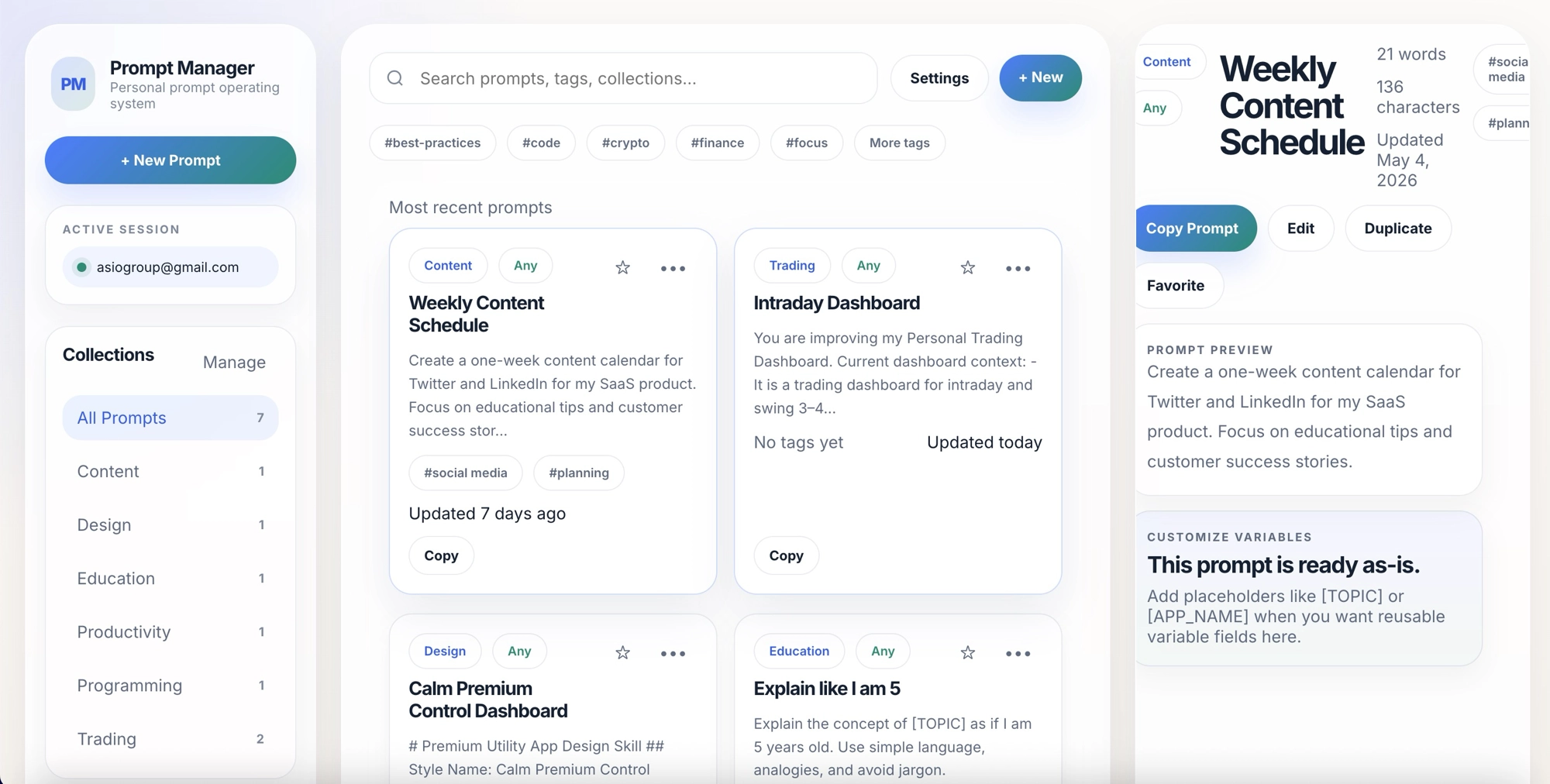
I built Prompt Manager because I needed a cleaner way to manage prompts across ChatGPT, Claude, Gemini, Codex, and other AI tools.It is designed as a personal prompt operating system.
You can use it to:
- Save reusable prompts
- Organize prompts by collection
- Add tags
- Mark favorites
- Label prompts by AI tool
- Use placeholders like [TOPIC] and [APP_NAME]
- Copy prompts quickly
- Add sample prompt packs
- Export and import JSON backups
It is not a big enterprise AI platform. It is a simple workspace for creators, bloggers, marketers, developers, students, and AI power users who want to stop rewriting the same prompts.
Get Prompt Manager →View Techtippr Products
How to build your first prompt library in 30 minutes
You do not need to organize everything perfectly on day one.Start small.
Step 1: Create 5 main collections
Start with:
- Blogging and SEO
- Social Media
- Marketing
- Design
- Productivity
Step 2: Save 3 prompts in each collection
Do not try to save 100 prompts immediately.
Start with 15 useful prompts.
Step 3: Add variables
Replace specific details with placeholders.
For example:
- [TOPIC]
- [AUDIENCE]
- [PRODUCT]
- [GOAL]
- [STYLE]
Step 4: Add tags
Use tags like:
- #seo
- #outline
- #social
- #landing-page
- #video
- #research
Step 5: Favorite your top prompts
Mark the prompts you will use every week.
These should be visible quickly.
Prompt library checklist for creators
Creator prompt library checklist:
- ✅ Create broad collections for your main work areas
- ✅ Save your best prompts instead of random prompt lists
- ✅ Add variables like [TOPIC], [AUDIENCE], and [PRODUCT]
- ✅ Use tags for SEO, social media, email, video, and ads
- ✅ Label prompts by AI tool
- ✅ Favorite prompts you use every week
- ✅ Keep a backup of your prompt library
- ✅ Review and improve your prompts monthly
Common mistakes when building an AI prompt library
Saving too many random prompts
Do not turn your prompt library into a dumping ground. Save prompts that match your actual workflow.
Not adding context
A prompt without context often gives average results. Save notes about when to use the prompt and what input it needs.
Ignoring variables
Variables are what turn one-time prompts into reusable templates.
Mixing every use case together
Blog prompts, design prompts, social prompts, and coding prompts should not all live in one endless document.
Never improving old prompts
Your prompt library should improve over time. If a prompt gives a weak result, edit it. If it gives a great result, save that version.
FAQ
What is an AI prompt library?
An AI prompt library is a saved collection of reusable prompts organized by use case, tool, tag, and workflow. It helps you reuse your best AI instructions instead of rewriting them every time.
Who should build an AI prompt library?
Bloggers, creators, marketers, YouTubers, newsletter writers, developers, students, solopreneurs, and anyone who uses AI regularly can benefit from a prompt library.
What should I include in my prompt library?
Include prompts for your repeated tasks: blog outlines, SEO titles, social posts, video scripts, newsletters, landing pages, research, productivity, design, and code review.
Should I use Notion or a dedicated prompt manager?
Notion is good if you like building custom systems. A dedicated prompt manager is better if you want a focused workspace for saving, tagging, filtering, favoriting, and copying prompts quickly.
How many prompts should I start with?
Start with 10–20 prompts you will actually use. Do not try to collect hundreds of prompts before building the habit of reusing them.
Can I use the same prompt library for ChatGPT, Claude, Gemini, and Codex?
Yes. Just label each prompt by tool so you know where it works best.
Final thoughts
A good AI prompt library is not about hoarding prompts.It is about building a repeatable creative system.
If you are a blogger, creator, marketer, or solo business owner, your prompt library can become one of your most useful productivity assets. It saves time, improves consistency, and helps you reuse your best AI workflows instead of starting from scratch every day.
Start with a few collections. Save your best prompts. Add variables. Use tags. Favorite your daily-use prompts.
And if you want a dedicated workspace for it, try Prompt Manager.
Related: How to Organize ChatGPT Prompts | How to Use AI to Write Blog Posts 5x Faster | Claude vs ChatGPT | Best AI Productivity Tools | Techtippr Products
Get Prompt Manager →View More Techtippr Products
Recommended for you
Video Editing Services
Human-led video editing from ₹399 per finished minute for YouTube, Shorts, talking-head videos, brand films and documentaries.
Our Product