
- 01What you need before you start
- 02Step 1: Collect your reference images
- 03Step 2: Blend two looks into one new character
- 04Step 3: Create the character sheet (the most important step)
- 05Step 4: Generate images in different scenarios
- 06Step 5: Pick your video tool: Higgsfield or HeyGen
- 07Step 6: Write scripts that sound human
- 08Step 7: Generate the videos in Higgsfield
- 09Step 8: Edit, caption and post
- 10Common mistakes to avoid
- 11Frequently asked questions
- 12Final thoughts
AI influencers are no longer a gimmick. Right now, creators are building virtual personalities from scratch, giving them a face, a voice and a personality, and posting Reels that look surprisingly real. One of the most popular tools for this is Higgsfield, a platform that puts several AI video models under one subscription.
The good news is that the process is simple once you know the order. In this guide, we will walk through the exact workflow: how to design your character with ChatGPT, build a character sheet so the face never changes, write natural scripts, and turn everything into short videos. Every step has a copy-paste prompt you can use straight away.
⚡ Quick answer: the 7-step workflow
- Collect reference images from Pinterest or Instagram (screenshots).
- Ask ChatGPT to blend two looks into one brand-new character.
- Create a character sheet so your character stays consistent.
- Generate images of your character in different scenarios.
- Write scripts with an AI writing assistant such as Claude.
- Turn the images and scripts into videos in Higgsfield (or HeyGen).
- Keep each video to about 30 to 45 seconds, then edit and post.
What you need before you start
| Job | Tool |
|---|---|
| Character images and character sheet | ChatGPT (image generation) |
| Persona and scripts | Claude (or any strong AI writing assistant) |
| Image to video | Higgsfield (or HeyGen for talking avatars) |
| Final edit, captions, music | CapCut (free) |
| Inspiration | Pinterest and Instagram |
Higgsfield and HeyGen both run on credits, and their plans and prices change often, so check each platform’s live pricing page before you subscribe. Free tiers exist, but they are mainly for testing the interface.
Step 1: Collect your reference images
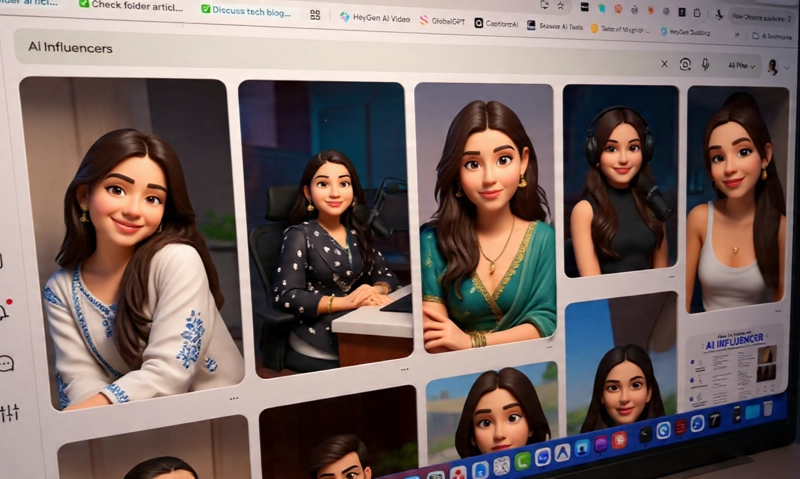
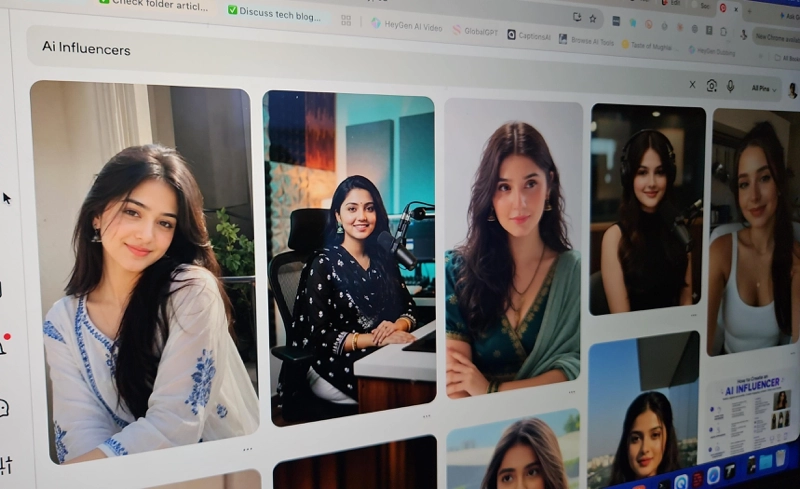
Every good AI influencer starts with a clear idea of the look. Open Pinterest or Instagram and take screenshots of the things you like: a hairstyle, an outfit, the lighting of a photo, a pose, the colour palette of a feed. You are not hunting for one perfect picture. You are building a small mood board of five to ten images.Save the screenshots in a folder on your phone or computer. Use them to guide the style of your character, such as clothes, mood and setting. Please do not recreate a real person’s face. We will deal with that in the next step.
Step 2: Blend two looks into one new character
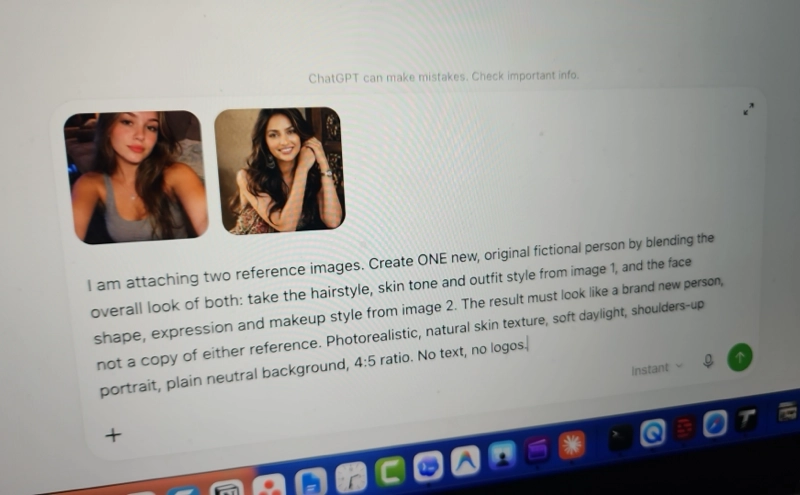
Here is the trick that works best: do not copy one person, blend two. Upload two reference images to ChatGPT and ask it to merge their overall vibe into a single new person. The result is an original character who belongs to nobody, which keeps your brand unique and avoids imitating a real individual.Generate a few options and pick the one that feels right. If an image tool refuses to work from photos of real people, describe the features in words instead, for example “sharp jawline, soft brown eyes, wavy shoulder-length hair”.
Step 3: Create the character sheet (the most important step)
This is the part most beginners skip, and it is the reason their influencer looks different in every video. A character sheet shows your character from every angle with a range of expressions. It works like a complete identity card. When you later convert a photo into a video, you give the AI this sheet as a reference, so the face, hair and outfit stay consistent.Check the result carefully. The face should look identical in every panel. If a panel is off, regenerate the sheet before moving on, because every future image and video depends on it. Save the final sheet in a safe place and back it up.
Add a written persona too
A face alone is not an influencer. Give your character a personality so every script sounds like the same person. Upload the character sheet and ask for a persona profile, then keep that document handy. It will feed your script prompts later.
Step 4: Generate images in different scenarios
Now put your character into real-life situations: a cafe, a gym, a street, a bedroom desk, a car. Attach the character sheet every time and describe the scene and outfit. Variety here gives you starting frames for videos later, and it makes your feed look like a real person’s life.Change only the text in square brackets and keep the rest of the prompt. Aim for 8 to 10 good scene images to begin with.
Step 5: Pick your video tool: Higgsfield or HeyGen
Both are strong, and they solve slightly different problems. I have used both. For the user interface and the overall experience, I find Higgsfield better. Many creators, however, use HeyGen because it makes automating talking videos easy.| Higgsfield | HeyGen | |
|---|---|---|
| Best for | Cinematic scenes, camera movement, lifestyle clips | Talking-head videos from a script |
| How it works | Choose from several video models in one account, upload your image, write a motion prompt | Upload a photo, paste a script or audio, get a lip-synced talking video |
| Consistency | Reference images, plus its own Soul ID character feature | Built around a single face you upload |
| Watch out for | Premium models cost more credits per clip | Top-quality avatar video uses credits quickly |
Higgsfield works as a hub, giving you access to several third-party video models (such as Kling, Veo and Seedance) plus its own, all under a shared credit balance. The exact model list changes often, so look at what is available on the day you sign up. Higgsfield also offers Soul ID, which trains a reusable character identity from reference photos. It is worth exploring once you are comfortable with the basics, but the character-sheet method in this guide works without it.
Step 6: Write scripts that sound human
A great-looking character with a stiff script will still flop. For scripts, my suggestion is to use Claude. In my experience, it writes more natural dialogue and handles human emotion better, so the lines feel real and sound real when spoken aloud. Other assistants can work too, but test a few and keep the one whose scripts you would actually say out loud.Always give the assistant the persona from Step 3, and always specify the length. A good speaking pace is around 2.5 words per second, so a 35-second Reel is roughly 85 to 90 words.
The first three seconds decide whether anyone keeps watching, so ask for alternative hooks and pick the strongest one.
Step 7: Generate the videos in Higgsfield
Open Higgsfield, choose an image-to-video model, and upload one of your scene images as the starting frame. Then paste a short motion prompt. Describe physical actions, not abstract ideas, and always end with a line that tells the model to keep the face, hair and clothes unchanged.Most video models produce short clips, so build your Reel from several shots and join them in the editor. Switch up the shot type: a close-up while she talks, a wide shot when she walks, a reaction at the end.
⏱ Keep each video to about 30 to 45 seconds
This length saves you generation credits, and short, tight Reels tend to hold attention better, which helps with reach. No length guarantees a viral video, but there is rarely a reason to go longer when you are just starting out.
How to save credits
- Test on a cheaper model first. Confirm the motion and framing, then run the final version on a premium model.
- Plan your shots before generating. A simple shot list prevents wasted attempts.
- Keep prompts short. One or two physical actions per clip works better than a paragraph.
- Reuse good clips. A strong reaction shot can appear in several Reels.
- Test the hook, not the whole video. Generate two or three opening clips, then commit to the best one.
If you would rather make a talking video directly from a photo, HeyGen’s Avatar IV feature turns a single image plus your script or audio into a lip-synced video. Use it for the shots where the character speaks for longer, and use Higgsfield for the cinematic ones.
Step 8: Edit, caption and post
Bring the clips into CapCut. Join them, add the voice track if you generated it separately, then add auto-captions, music and a simple cut every two to three seconds. Export in vertical 1080 x 1920 (9:16). Write a short caption, add a few relevant hashtags and post at the same time each day to build a rhythm.Common mistakes to avoid
- Skipping the character sheet. This is the number one cause of a face that keeps changing.
- Changing the reference image every time. Use the same sheet and the same base images.
- Over-describing the motion. Long prompts confuse the model and burn credits.
- Using a flat script. If you would not say it out loud, rewrite it.
- Posting without a hook. The opening seconds matter more than anything else.
⚠️ Be transparent and responsible
Create an original character instead of copying a real person or celebrity, and never use someone’s face without permission. Platforms such as Instagram, TikTok and YouTube ask you to label realistic AI-generated content, especially in sponsored posts, so turn on the AI label when posting and say it in your bio. Many successful AI creators make this part of their identity.
Frequently asked questions
Do I need Higgsfield, or can I use another tool?
You can use any image-to-video tool. The workflow of references, a character sheet, scene images and short motion prompts works almost everywhere. Higgsfield is a convenient choice because several models live in one account.
Why does my character look different in every video?
Usually because the reference changed or the character sheet was weak. Upload the same sheet or base image every time, and add the line “keep the face, hair and clothes exactly the same” to every motion prompt.
Is Higgsfield free?
There is a limited free tier for testing, and premium models need a paid plan. Plans change often, so check the current pricing page.
Can I make an AI influencer completely free?
You can test the whole workflow cheaply: free image generation limits, a free editor like CapCut and free trial credits. For regular posting without watermarks, expect to pay for at least one video tool.
Final thoughts
Building an AI influencer comes down to a repeatable system: blend two looks into one original character, lock it in with a character sheet, write human-sounding scripts, and generate short videos from consistent images. Start with one character, one topic and five short Reels, and then refine what works.Keep every prompt in one place so you can reuse and improve them. If you want a tidy home for them, our Prompt Manager is built for exactly that.
📖 Keep reading on Techtippr
Recommended for you
Video Editing Services
Human-led video editing from ₹399 per finished minute for YouTube, Shorts, talking-head videos, brand films and documentaries.
Our Product