

- 011. Claude — Best for Long-Form Writing and Deep Research
- 022. ElevenLabs — Best AI Voiceover for Creators
- 033. Descript — Best AI Video Editor for Creators
- 044. CapCut — Best Free AI Tool for Shorts and Reels
- 055. Make.com — Best Automation Tool for Creators
- 066. Perplexity — Best AI Research Tool for Creators
- 077. Notion — Best for Organising Your Creator Brain
- 088. Reclaim.ai — Best for Protecting Your Creative Time
- 09All 8 Tools at a Glance
- 10The AI-Assisted Creator Workflow
- 11Frequently Asked Questions
Most “best AI tools” lists are the same article published under a different date. They recommend the same five tools, describe features you could read from any product homepage, and skip the question that actually matters: which tools fit together into a workflow that saves real time?
This list is built differently. Every tool here was evaluated on one criterion — does it remove a meaningful bottleneck in a content creator’s day? Writing the first draft, editing video, generating voiceover, researching topics, automating repetitive tasks, keeping the schedule from collapsing. Each category gets one pick. No padding.
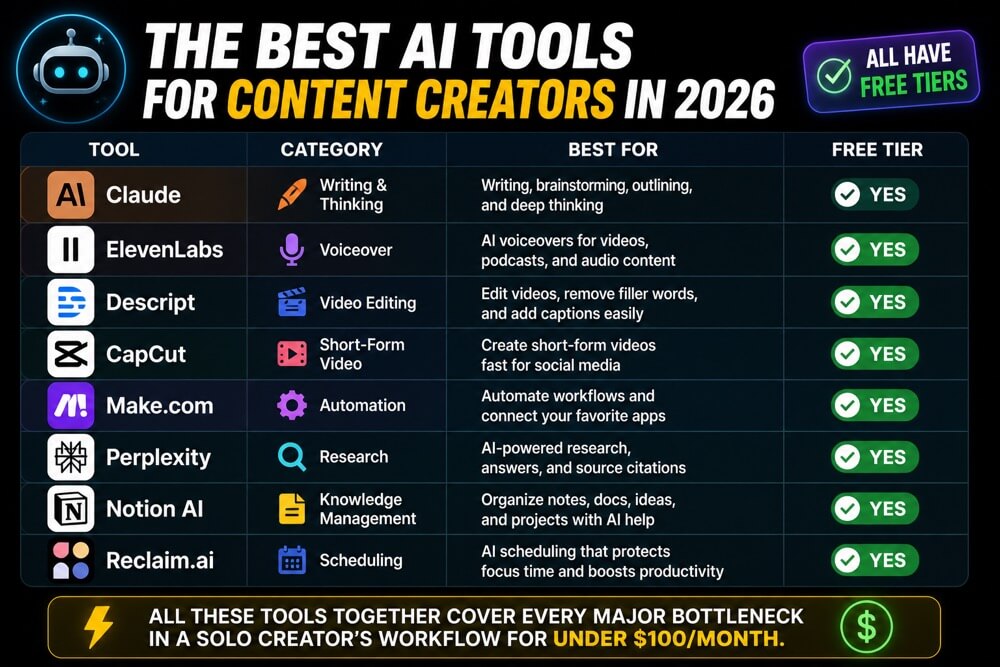
Short Answer: The best AI tools for content creators in 2026, by category: Claude for writing and thinking, ElevenLabs for voiceover, Descript for video editing, CapCut for short-form video, Make.com for automation, Perplexity for research, Notion AI for knowledge management, and Reclaim.ai for scheduling. All have free tiers. Combined, they cover every major bottleneck in a solo creator’s workflow for under $100/month.
1. Claude — Best for Long-Form Writing and Deep Research
Most content creators reach for ChatGPT first because it’s the brand they know. But for long-form writing, nuanced editing, and anything that requires holding a complex brief in working memory, Claude consistently produces better output. Its 200,000-token context window means you can paste an entire research document, a competitor article, and your style guide into a single conversation and get a draft that actually reflects all three.Claude excels at the tasks that drain creators most: turning a messy research dump into a coherent draft, editing a piece for tone without stripping your voice, writing 10 headline variations that aren’t all the same idea, and stress-testing your argument before you publish. For YouTube scripts specifically, Claude’s ability to write in a conversational register — rather than formal essay prose — makes it more useful than most dedicated scriptwriting tools.
Claude quick facts: Free tier available · 200k token context window · Claude Pro: $20/month
Best for: Blog posts, YouTube scripts, email newsletters, editing drafts you’ve already written
2. ElevenLabs — Best AI Voiceover for Creators
ElevenLabs is the tool that made AI voiceover genuinely usable for professional content. The output is indistinguishable from a human voice actor for most use cases — not “good for AI,” actually good. For creators who produce video content but can’t or don’t want to record every voiceover themselves, ElevenLabs removes the biggest audio bottleneck in the production pipeline.The practical use case for most creators: paste your script, choose a voice, generate the audio, drop it into your video editor. The whole process takes under three minutes. ElevenLabs also lets you clone your own voice — train it on a few minutes of audio — so AI-generated content sounds like you rather than a generic voice. The free tier gives you 10,000 characters per month, roughly enough for one medium-length YouTube video.
ElevenLabs quick facts: Free: 10,000 chars/month · Voice cloning included · Starter plan: $5/month
Best for: YouTube voiceover, podcast intros, video ads, accessibility audio
3. Descript — Best AI Video Editor for Creators
Descript inverts the video editing process: instead of working in a timeline, you edit the transcript. Delete a sentence from the text, and it disappears from the video. Remove every “um” and “uh” automatically. Record overdubs in your own voice for sections you want to re-record without sitting back in front of a camera. For talking-head content — which is most YouTube content — this approach removes roughly 60% of the editing time.The “Studio Sound” feature cleans up room noise and mic imperfections in one click. For podcasters, the multi-track editing interface handles guest recordings cleanly. For short-form creators, Descript’s automatic clip creation finds highlight moments in a long video and creates 60-second vertical cuts ready for Shorts or Reels. The free tier allows 1 hour of transcription per month — paid tiers start at $12/month.
Descript quick facts: Free: 1 hour transcription/month · Filler word removal · Hobbyist plan: $12/month
Best for: YouTube editing, podcast production, creating short-form clips from long videos
4. CapCut — Best Free AI Tool for Shorts and Reels
CapCut is the dominant short-form video editor for a reason: it has the most comprehensive AI feature set of any free tool in this category. Auto-captions that actually sync, template-based editing for consistent Shorts aesthetics, background removal, auto-reframe for vertical crop, and a script-to-video generator that works better than most paid alternatives. For creators who produce primarily short-form content, CapCut is the only video tool you need.The auto-caption feature alone justifies adding CapCut to your stack. It transcribes and syncs captions in under two minutes, with accuracy that beats most paid transcription services. For batch content creators producing 3–5 Shorts per week, the template system lets you apply a consistent visual style to every video in one click. CapCut’s free tier is genuinely generous — the watermark is minimal and easy to remove by signing up for a free account.
CapCut quick facts: Completely free · Auto-captions included · Desktop and mobile apps available
Best for: YouTube Shorts, Instagram Reels, TikTok, repurposing long-form into short clips
5. Make.com — Best Automation Tool for Creators
Every content creator has repetitive workflows that don’t require human judgment: posting to multiple platforms after publishing, sending a newsletter when a new video goes live, moving a completed draft from one folder to another, adding a new subscriber to the right email sequence. Make.com automates all of it with a visual drag-and-drop interface that requires no coding knowledge — and its library of 1,000+ app integrations means your existing tools almost certainly connect.Make’s visual scenario builder is the most intuitive automation interface available at its price point. You can see your entire workflow as a flowchart — each step is a module, each connection is a line between them. Practical creator automations: new YouTube upload → auto-post clip to Twitter and LinkedIn, new blog post → generate social captions with AI → schedule to Buffer, new email subscriber → tag based on which lead magnet they downloaded. The free tier includes 1,000 operations per month, which handles most small creator workflows without a paid plan.
Make.com quick facts: Free: 1,000 ops/month · 1,000+ app integrations · Core plan: $9/month
Best for: Cross-platform publishing, content repurposing, email automation, connecting tools you already use
6. Perplexity — Best AI Research Tool for Creators
Perplexity is what Google should have become. Every answer cites its sources, so you can verify claims immediately rather than hunting through 10 browser tabs. For creators who need to research quickly and accurately — checking statistics, finding recent data, understanding a topic before writing about it — Perplexity replaces an hour of browsing with a five-minute conversation.The “Deep Research” feature is the standout: ask a complex question and Perplexity searches dozens of sources, reads each one, and produces a synthesised report with inline citations. For content creators, this is invaluable for topic research before writing a pillar article, finding statistics and data points that need verification, and understanding competitor coverage on a topic. The free tier covers most research needs — Pro ($20/month) adds more sources per query and longer reports.
Perplexity quick facts: Free tier available · All answers cited with sources · Pro plan: $20/month
Best for: Pre-writing research, fact-checking, finding data points, competitor content analysis
7. Notion — Best for Organising Your Creator Brain
Notion is where everything your AI tools produce goes to live permanently. Drafts, research notes, content calendars, brand guidelines, SOPs, editorial plans — Notion stores, connects, and retrieves all of it. Used alone, it’s the best note-taking and project management tool for creators. Paired with an AI writing tool, it becomes the persistent memory that AI tools currently lack: paste your Notion context into Claude at the start of every session, and every output is grounded in your actual project history.For content creators, the minimum viable Notion setup is two databases: a Content Calendar (status, platform, publish date, brief) and a Notes database (research, ideas, evergreen reference material). Notion AI adds in-context summarisation and drafting — useful for quick tasks like “summarise this research note” or “turn these bullet points into a section intro.” For high-quality writing, use Claude instead; for organising and retrieving what you’ve already produced, Notion is the best tool available.
Notion quick facts: Free plan available · Notion AI available as add-on · Plus plan: $10/month
Best for: Content calendar, editorial planning, storing research, brand and style guides, SOP documentation
8. Reclaim.ai — Best for Protecting Your Creative Time
The hardest part of being a content creator isn’t finding the tools — it’s protecting the uninterrupted time to use them. Reclaim.ai connects to your Google Calendar and automatically schedules your tasks, habits, and focus blocks around your existing meetings. It defends deep work time, moves lower-priority tasks when meetings overrun, and re-optimises your schedule in real time. For creators who manage their own time without an assistant, it’s the closest thing to having a scheduling coordinator.The “Habits” feature is the most useful for creators: set a daily writing block (e.g., 90 minutes between 8am and 11am), and Reclaim automatically finds the optimal slot each day, reschedules it if a meeting appears, and marks it as busy so others can’t book over it. The free plan covers one calendar with basic habit and task scheduling — the Starter plan ($10/month) adds more concurrent habits and team features.
Reclaim.ai quick facts: Free plan available · Google Calendar sync · Starter plan: $10/month
Best for: Protecting writing and recording time, scheduling tasks automatically, preventing creative work from getting displaced by meetings
All 8 Tools at a Glance
Here’s a quick summary of every tool, its category, and what it costs:- Claude — Writing and AI · Free tier · Pro $20/month · Best for scripts, blog posts, editing
- ElevenLabs — Voiceover · 10k chars/month free · Starter $5/month · Best for video voiceover and voice cloning
- Descript — Video editing · 1hr transcription free · Hobbyist $12/month · Best for talking-head YouTube editing
- CapCut — Short-form video · Completely free · Best for Shorts, Reels, auto-captions
- Make.com — Automation · 1,000 ops/month free · Core $9/month · Best for cross-platform publishing
- Perplexity — Research · Free tier · Pro $20/month · Best for pre-writing research
- Notion — Knowledge management · Free tier · Plus $10/month · Best for content calendar and notes
- Reclaim.ai — Scheduling · Free tier · Starter $10/month · Best for protecting creative time
How to build your stack without overwhelm:
Don’t add all eight tools at once. Start with the one that removes your biggest bottleneck today. If writing takes the longest, start with Claude. If video editing is the bottleneck, start with Descript. Add one tool per month, not eight in a weekend. A stack of three tools you actually use beats eight tools that create their own overhead.
The AI-Assisted Creator Workflow
These tools work best when connected in sequence rather than used in isolation. Here’s how a complete content production workflow looks with all eight tools in play:- Research with Perplexity — Run a Deep Research query on your topic. Save the report to Notion with source links and key data points.
- Write with Claude — Paste the Perplexity report and your Notion style guide into Claude. Ask it to draft an outline, then expand each section. Edit the draft yourself — AI gives you the structure, your voice makes it worth reading.
- Record and edit with Descript — Record the video using your Claude script. Import to Descript, remove filler words, edit by transcript, apply Studio Sound.
- Generate voiceover with ElevenLabs — For sections you want re-recorded without re-filming, or for voiceover-only explainer content, paste the script into ElevenLabs and generate audio in your cloned voice.
- Create Shorts with CapCut — Export Descript clips into CapCut. Add auto-captions, apply your template, export for Shorts and Reels.
- Automate distribution with Make.com — New YouTube video triggers: blog post draft created, social captions generated, newsletter section added. One publish triggers everything.
- Protect the next session with Reclaim.ai — Reclaim schedules tomorrow’s writing block automatically. Your creative time is defended before you even close your laptop.
Full stack cost check:
- ✅ Claude Pro — $20/month (or free tier to start)
- ✅ ElevenLabs Starter — $5/month
- ✅ Descript Hobbyist — $12/month
- ✅ CapCut — Free
- ✅ Make.com Core — $9/month
- ✅ Perplexity Pro — $20/month (or free tier)
- ✅ Notion Plus — $10/month (or free tier)
- ✅ Reclaim.ai Starter — $10/month (or free tier)
Related reading: How to Automate Your Daily Tasks Using AI (Practical Guide for Non-Coders) and AI Productivity Tools for Beginners — Where to Actually Start.
Frequently Asked Questions
What is the best free AI tool for content creators?
CapCut is the best completely free AI tool for video content creators — its auto-caption, template, and AI editing features are unrestricted on the free plan. For writing, Claude and ChatGPT both have free tiers that cover basic drafting and editing. For research, Perplexity’s free tier handles most everyday queries. A creator can build a productive AI workflow using only free tiers before committing to any paid subscriptions.
Can AI tools replace a content creator?
No — but they can make one creator produce what used to require a small team. AI handles the mechanical parts of content production: transcription, filler word removal, draft generation, voiceover, research synthesis, and distribution automation. The creative judgment — what topic matters, what angle is interesting, what voice is authentic — remains entirely human. The creators who struggle with AI are those trying to outsource their perspective. The ones who thrive use AI to remove everything that isn’t their perspective.
What AI tools do YouTubers use?
The most commonly used combination among established YouTubers: Descript for video editing, ElevenLabs for voiceover when not recording themselves, CapCut for Shorts creation, Claude or ChatGPT for scripting and titles, and Notion for content planning. Make.com or Zapier for distribution automation. The specific mix varies by content type — faceless channels rely more heavily on ElevenLabs, talking-head creators prioritise Descript, short-form focused channels are almost universally on CapCut.
How much does a full AI creator tool stack cost per month?
A full paid stack — Claude Pro ($20) + ElevenLabs Starter ($5) + Descript Hobbyist ($12) + Make.com Core ($9) + Perplexity Pro ($20) + Notion Plus ($10) + Reclaim Starter ($10) — comes to approximately $86/month. CapCut is free. Many creators start with only free tiers and upgrade the specific tool that becomes a bottleneck, so the real entry cost is $0 and you scale up as revenue warrants it.
What is the best AI tool for writing YouTube scripts?
Claude is the best AI tool for YouTube scripting because it handles long-form conversational writing better than most alternatives, and its large context window means you can include your previous scripts, channel style guide, and audience notes in the same session. The output reads like a person talking rather than an essay — which is what YouTube scripts require. For short-form scripts (Shorts, Reels), ChatGPT’s speed advantage matters more than Claude’s depth, making it the better choice for high-volume short-form production.
Start with AI Basics ↗
Automate Your Workflow →
If you’re just getting started, don’t try to build the full stack at once. Pick the tool that removes your single biggest bottleneck — then actually use it for a month before adding another. The goal isn’t to have the most sophisticated setup. The goal is to spend more of your time doing the creative work only you can do.
Recommended for you
Video Editing Services
Human-led video editing from ₹399 per finished minute for YouTube, Shorts, talking-head videos, brand films and documentaries.
Our Product