
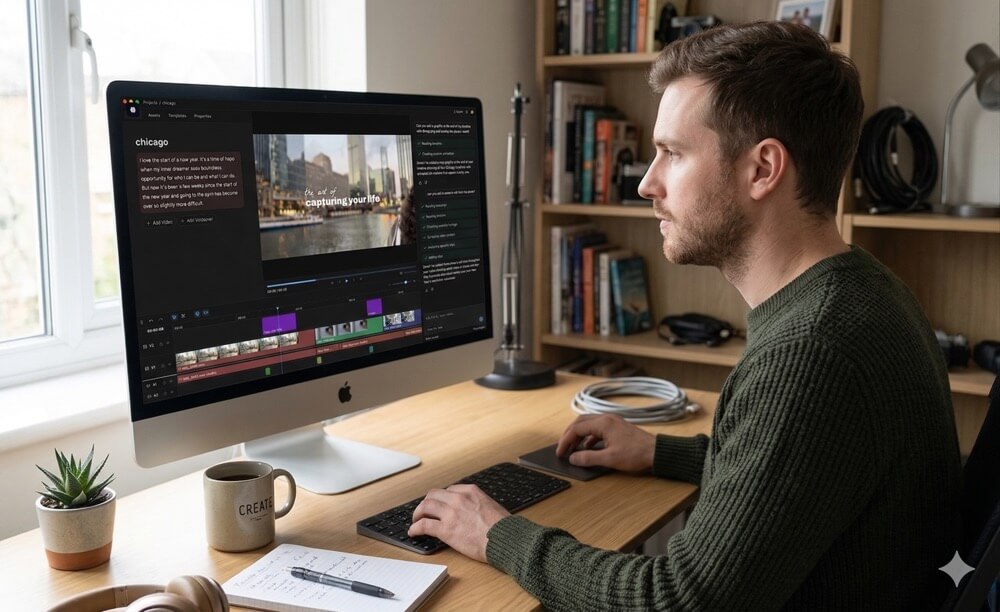
🎬 Daydream: The AI Video Editing Workspace Every Solo Creator & Business Should Know About
Natural language video editing, AI agent integration, and privacy-first local processing — Daydream is quietly changing how creators and businesses make video content.
| 🤖 AI-Powered | 🎥 Video Editing | 💵 Free Tier Available |
⚡ Quick Answer:
Daydream is an AI-native video editing workspace that lets you edit videos using plain-English commands. It supports transcript-based editing, AI agent integration via MCP, and privacy-focused local processing. It’s free to start (1 hr/month), with a Pro plan at $16/month. Ideal for solo creators, small businesses, educators, and corporate teams who want to produce professional videos without mastering complex software.
Traditional video editing tools like Adobe Premiere Pro or Final Cut Pro are incredibly powerful but come with steep learning curves. For many creators, the challenge isn’t creativity — it’s the technical barrier. Hours are spent trimming clips, synchronising audio, removing filler words, and adding visual elements.
Daydream shifts the paradigm by introducing a conversation-driven editing experience. Instead of manually manipulating a timeline, you instruct the AI with natural language prompts:
💬 Example Prompts
| 💡 What This Means
|
Daydream is an AI-native video editing workspace designed to simplify and accelerate the creative process. It combines transcript-based editing, AI agent integration, and privacy-focused local processing to deliver a seamless editing experience.
☁️ Unlike Cloud-Based Tools
| 🔗 Professional Integration
|
💬 1. Natural Language Video Editing
At the heart of Daydream is its ability to interpret and execute natural language commands, eliminating the need for technical expertise and allowing creators to focus on storytelling.
| 🎬 Trim podcast sections | 🎥 Add engaging b-roll | 📜 Auto-generate captions | 🆁 Reorder scenes |
🤖 2. Agent-Integrated Editing with MCP
Daydream integrates with AI agents through the Model Context Protocol (MCP), meaning tools like ChatGPT, Claude, or Cursor can effectively act as your video editor.
| 🔹 Manage content workflow inside your AI ecosystem | 🔹 Automate pipelines for repetitive tasks | 🔹 Scalable content production for teams |
📋 3. Transcript-Based Editing
Edit videos by modifying the text transcript. Deleting a sentence from the transcript automatically removes the corresponding video segment — like editing a Word document.
| 🟢 Rapid editing without timeline navigation | 🟢 Auto-removes “um” and “uh” | 🟢 Seamless content restructuring |
🔒 4. Privacy-Focused Local Processing
Instead of uploading large video files to the cloud, all processing occurs on your device — a critical advantage for businesses handling sensitive information.
| 🔴 Enhanced data security | 🔴 Faster processing speeds | 🔴 Ideal for finance, healthcare & legal |
🆕 Free Tier $0
| ⭐ Pro Tier $16/mo
| 🏢 Business Custom
|
Comparing Daydream against traditional editors across 6 key dimensions:
| Ease of Use |
|
| Natural Language |
|
| Transcript Edit |
|
| Privacy (Local) |
|
| Automation |
|
| Learning Curve |
|
Daydream’s integration with AI agents via MCP represents a significant step toward full automation of creative workflows. Here’s how an end-to-end pipeline could look:
|
1 | Import Footage Upload your raw video files directly into the Daydream platform. |
2 | Generate Transcript Daydream automatically transcribes the audio with high accuracy. |
3 | Edit Using Natural Language Use prompts to trim, rearrange, or enhance your video with plain English commands. |
4 | Enhance with Visual Elements Add b-roll, graphics, captions, and transitions automatically. |
5 | Review and Refine Make final adjustments within Daydream or export to Premiere Pro / DaVinci Resolve for advanced work. |
6 | Export and Publish Export in your desired format and share across YouTube, LinkedIn, Instagram, and more. |
💡 Pro Tip:
Combine Daydream with ChatGPT or Claude via MCP to create a fully automated content pipeline. Let AI draft your script, record your footage, then let Daydream handle editing, captions, and packaging — all without leaving your AI ecosystem. Label your footage files clearly to maximize the AI’s efficiency.
✅ Daydream Works Great For
| ⚠️ May Not Suit
|
📺 YouTube Content Creation Transform raw footage into polished videos with captions, b-roll, and engaging visuals. | 🎧 Podcast Repurposing Edit long-form podcasts into short social media clips efficiently. |
🎓 Online Courses Educators and coaches can produce professional training videos with minimal effort. | 💼 Corporate Training HR and L&D teams can develop engaging training materials quickly and securely. |
🔵 For Solo Creators Daydream is a game-changer — reduce editing time dramatically, eliminate technical barriers, and maintain a consistent publishing schedule without hiring an editor. | 🟢 For Businesses Scale video marketing, protect sensitive content with local processing, and automate workflows via MCP — a cost-effective solution for growing teams and agencies. | 🟥 Overall One of the most innovative AI video tools of 2024–25. The free tier makes it risk-free to try, and the Pro plan at $16/month is exceptional value for consistent creators. |
🚀 Bottom Line
In a world where video content dominates digital communication, Daydream stands out as a transformative platform that empowers both solo creators and businesses to produce high-quality videos with ease. By combining natural language editing, AI agent integration via MCP, transcript-based workflows, and privacy-focused local processing, Daydream bridges the gap between creativity and technology. Whether you’re building a personal brand or scaling a business, this AI-powered workspace gives you the tools to turn ideas into compelling visual stories — starting for free, today.
Why You Can’t Focus Anymore (And 6 Science-Backed Fixes)
How Smartphones Are Destroying Your Attention Span (And What the Research Actually Says)
AI Productivity Tools for Beginners: The Complete Getting-Started Guide (2026)
Recommended for you
Video Editing Services
Human-led video editing from ₹399 per finished minute for YouTube, Shorts, talking-head videos, brand films and documentaries.
Our Product