
- 01Who Needs AI Data Analysis Tools
- 021. ChatGPT Advanced Data Analysis — Best for Ad-Hoc Exploration
- 032. Julius AI — Conversational Data Exploration
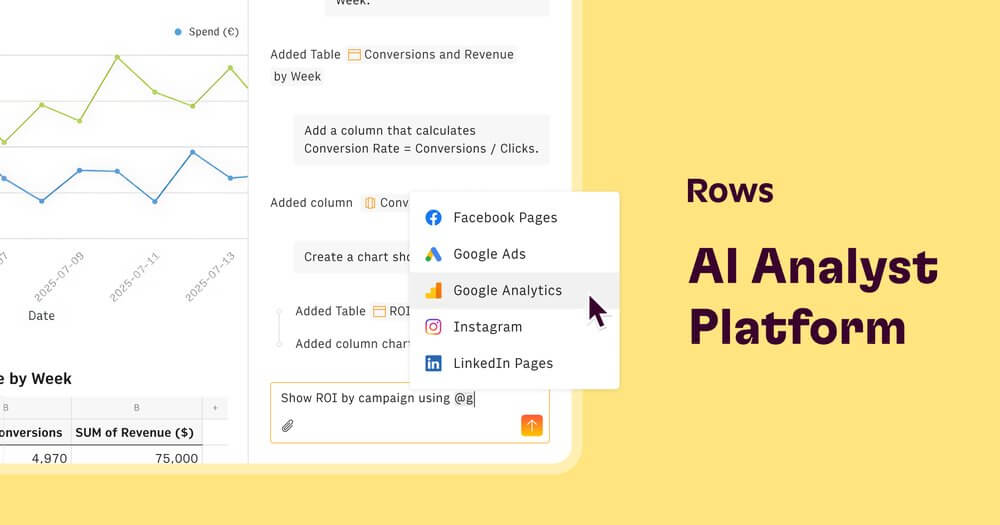
- 043. Rows — AI-Powered Spreadsheets
- 054. Tableau AI — Enterprise BI with Natural Language
- 065. Google Looker Studio with Gemini — Free Dashboard Creation
- 07Honourable Mentions
- 08Frequently Asked Questions
- 09Bottom Line
Data analysis used to require either a data analyst or a working knowledge of SQL, Python, and visualisation tools. AI has changed that. You can now ask questions about your data in plain English, get charts generated automatically, and surface insights that would have taken hours to find manually — no coding required.
Short Answer: The best AI data analysis tools in 2026 are ChatGPT Advanced Data Analysis (best for ad-hoc analysis on any file), Julius AI (best for conversational data exploration), Rows (best for AI-powered spreadsheets), Tableau AI (best for enterprise BI with natural language queries), and Google Looker Studio with Gemini (best for free dashboard creation). The right choice depends on your data size, technical level, and whether you need shareable outputs.
Who Needs AI Data Analysis Tools
Anyone who works with data but doesn’t have a data science background. Marketing managers interpreting campaign results. Business owners reading their own financial data. Product managers analysing user behaviour. Operations teams spotting inefficiencies in process data. These tools close the gap between having data and understanding it.
1. ChatGPT Advanced Data Analysis — Best for Ad-Hoc Exploration
ChatGPT’s Advanced Data Analysis mode (included in ChatGPT Plus) lets you upload a CSV, Excel file, or PDF and then ask questions in plain English. It writes Python code internally, runs it, and shows you the results — charts, summaries, correlations, anomalies — without you ever seeing the code unless you want to.
Upload a month of sales data and ask “what’s driving the drop in revenue in week three?” and you’ll get a genuine analysis with supporting charts. It’s the fastest way to go from raw data to insight for a non-technical user.
- Supports CSV, Excel, JSON, PDF uploads
- Generates publication-ready charts and graphs
- Can clean messy data, merge tables, and perform statistical analysis
- Included in ChatGPT Plus at $20/month
2. Julius AI — Conversational Data Exploration
Julius is built specifically for data analysis through conversation. Connect spreadsheets, databases, or upload files, then ask questions, request visualisations, and iterate through follow-ups. The interface is designed for analysts who want the speed of AI without the friction of switching between a chat interface and their data tool.
Julius handles multi-step analysis well — “show me monthly revenue by region, then calculate the growth rate, then flag any region below 10% growth” runs as a single conversation thread. The output can be exported or shared as an interactive report.
3. Rows — AI-Powered Spreadsheets
Rows is a spreadsheet tool with AI built into the cells. The AI Analyst feature answers questions about your data directly in the spreadsheet. The AI column generates values using natural language instructions — “classify this customer feedback as positive, neutral, or negative” runs on every row automatically.
For teams that live in spreadsheets and don’t want to learn a new tool, Rows brings AI analysis into a familiar interface. The shareable, interactive output is more useful for stakeholder reporting than a raw Excel file.
Data workflow example:
Export raw data → ChatGPT Advanced Data Analysis for quick exploration → Julius for deeper conversational analysis → Rows or Looker Studio for ongoing dashboard
4. Tableau AI — Enterprise BI with Natural Language
Tableau’s Einstein Copilot (powered by Salesforce AI) lets users ask questions of their Tableau dashboards in plain English and get answers with automatic chart generation. For organisations already running Tableau for business intelligence, this removes the barrier between executives asking questions and getting answers — without needing an analyst to build a new view for every request.
Tableau is enterprise-priced and requires existing data infrastructure. For smaller teams, Looker Studio or Julius are more appropriate.
5. Google Looker Studio with Gemini — Free Dashboard Creation
Looker Studio (formerly Google Data Studio) is free and connects to Google Analytics, Google Ads, Google Sheets, BigQuery, and dozens of other sources. The Gemini AI integration adds natural language querying to existing dashboards. For businesses already in the Google ecosystem, it’s the fastest path to an AI-enhanced BI setup with no additional budget.
Honourable Mentions
- Obviously AI — no-code predictive modelling: build and deploy ML models without writing code
- Polymer — upload any spreadsheet and get an AI-generated interactive dashboard
- Akkio — AI forecasting and prediction for business data, designed for non-technical users
- Hex — collaborative data notebooks with AI assistance, popular with data teams
Warning: Never upload personally identifiable information (PII), customer financial data, or confidential business data to consumer AI tools like ChatGPT unless you’ve verified the data processing terms. Use enterprise versions with data processing agreements, or anonymise data before uploading.
Data Analysis AI Checklist:
- ✅ Ad-hoc file analysis: ChatGPT Advanced Data Analysis
- ✅ Conversational data exploration: Julius AI
- ✅ AI-enhanced spreadsheets: Rows
- ✅ Free dashboards (Google ecosystem): Looker Studio + Gemini
- ✅ Never upload PII to consumer AI tools
- ✅ Always validate AI-generated insights against source data
Frequently Asked Questions
Can non-technical people really use these tools effectively?
Yes — that’s the whole point. ChatGPT Advanced Data Analysis and Julius AI are specifically designed for people without coding or SQL skills. You describe what you want in plain English and the tool handles the technical execution. The learning curve is learning to ask good questions, not learning to write code.
How accurate are AI data analysis results?
High accuracy on mathematical operations and aggregations. More variable on interpretive conclusions — AI may surface a pattern that’s statistically present but not causally meaningful. Always validate significant findings against your own business knowledge and, where the stakes are high, verify with a human analyst.
Is there a free AI data analysis tool?
Google Looker Studio is free for dashboard creation. ChatGPT’s free tier has limited Advanced Data Analysis access. Julius has a free tier with usage limits. For most casual analysis needs, these free options are sufficient to start.
What’s the difference between Julius AI and ChatGPT Advanced Data Analysis?
ChatGPT is a general tool that happens to do data analysis very well. Julius is purpose-built for data — it has better multi-step analysis, database connections, and is designed to be used repeatedly on the same datasets over time. For ongoing data work, Julius is usually the better choice. For one-off analysis, ChatGPT is faster to get into.
Try Julius AI Free ↗
Explore Rows
Bottom Line
AI data analysis tools in 2026 are genuinely democratising — you no longer need to know SQL or Python to get real insight from your business data. Start with ChatGPT Advanced Data Analysis for immediate value, move to Julius or Rows for ongoing work. Data-driven decisions are no longer the exclusive domain of companies with data teams.
For the broader business context, see our best AI tools for small business owners, and if you’re building on top of your data, the best AI tools for developers in 2026 covers the technical stack.