
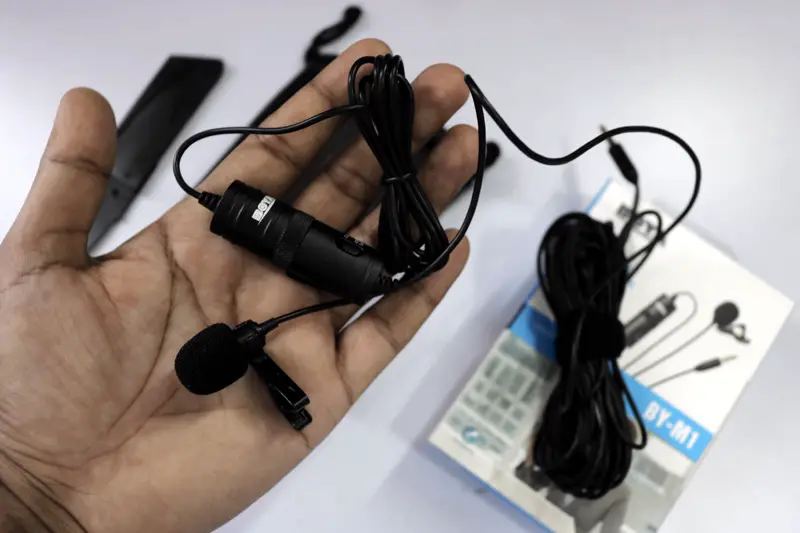
The Boya BY-M1 is the microphone that appears in the recommendations of almost every budget YouTube and content creation guide. At $20–25, it’s remarkably capable. But is it actually good, or just cheap? Here’s an honest review after extended use.
Short Answer: The Boya BY-M1 is genuinely one of the best value microphones for beginner YouTubers and content creators. For under $25, it delivers dramatically better audio than any built-in camera or phone microphone. Its limitations (cable only, some handling noise) are real but acceptable at the price.
What the Boya BY-M1 Is
The BY-M1 is a small clip-on (lavalier) omnidirectional condenser microphone. You clip it to your collar or lapel, run the cable to your phone or camera’s 3.5mm input, and it records your voice cleanly at a consistent distance regardless of how you move your head.
What It Does Well
Audio Quality
The improvement over built-in mics is substantial and immediately audible. The BY-M1 picks up voice clearly, reduces room noise significantly (because it’s close to your mouth), and handles most vocal frequencies well. For talking-head videos, tutorials, and vlogs, it does the job.
Compatibility
The 3.5mm TRRS connector works directly with smartphones (iPhone with Lightning adapter, most Android phones). A 6.3mm adapter is included for cameras with standard audio jacks. One cable handles both use cases.
Build Quality
Surprisingly solid for the price. The clip holds firmly, the cable is flexible without tangling excessively, and the windshield foam (included) works adequately for light outdoor use.
Where It Falls Short
Handling Noise
The cable picks up noise when it rubs against clothing. Route it under your shirt or secure it with a clip to minimize this. It’s manageable but requires attention.
Omnidirectional Pickup
An omnidirectional mic picks up sound from all directions — including background noise. In a noisy environment, the BY-M1 will pick up more ambient sound than a directional (cardioid) mic. Record in a quiet space for best results.
No Wireless
Cable-only. Not a dealbreaker for desk recording, but limits flexibility for walking shots or active presentations. The Rode Wireless GO (~$199) is the first significant wireless upgrade.
📸 SCREENSHOT NEEDED: Boya BY-M1 clipped to a shirt collar with cable routed neatly, connected to a smartphone
Best placement:
Clip the BY-M1 at sternum height (center chest, below the collar). This gives the right distance for natural-sounding voice capture. Too close sounds boomy; too far loses presence. Tuck the cable under your shirt to prevent handling noise.
Boya BY-M1 vs Competitors
- Rode SmartLav+ ($60): Noticeably better audio quality, significantly less handling noise, and better wind rejection. Worth it for regular creators. 3x the price though.
- COMICA CVM-V01SP ($25): Direct competitor, slightly better directionality. Nearly identical audio quality to the BY-M1.
- Shure MVL ($60): Better isolation, more professional build. For more frequent use.
Warning: Some camera models and older audio interfaces don’t supply plug-in power to the TRRS input, which means the BY-M1 will produce very quiet audio. If your recordings are barely audible, check if your device supports plug-in power for lavalier mics.
Quick checklist:
- ✅ Clip at sternum height for best voice capture
- ✅ Route cable under clothing to prevent handling noise
- ✅ Use the included foam windshield outdoors
- ✅ Check that your camera or phone provides plug-in power (TRRS input required)
- ✅ Upgrade to Rode SmartLav+ when ready — the next meaningful step up
FAQ
Does the Boya BY-M1 work with iPhone?
Not directly — you need a Lightning to 3.5mm adapter (Apple’s official adapter works; third-party adapters sometimes don’t). On iPhone 15 and later with USB-C, you need a USB-C to 3.5mm adapter.
Can I use the Boya BY-M1 with a DSLR?
Yes, using the included 6.3mm adapter. Plug it into your camera’s microphone jack. Most DSLRs and mirrorless cameras have a 3.5mm microphone input.
Is the Boya BY-M1 good for interviews?
For one person, yes. For two-person interviews, you’d need two mics (one per person) or a bidirectional desktop mic. The BY-M1 is a single-person lavalier.
Best Budget Microphones for YouTube ↗YouTube Audio Guide
For $20–25, the Boya BY-M1 is an exceptional value. The immediate improvement over any built-in microphone makes it the first upgrade every new YouTuber should make — before a new camera, new lighting, or any other equipment.
Recommended for you
Video Editing Services
Human-led video editing from ₹399 per finished minute for YouTube, Shorts, talking-head videos, brand films and documentaries.
Our Product