
Overhead or top-down videos — the kind you see in cooking channels, ASMR, craft tutorials, and unboxings — look professional but don’t require expensive gear. Here’s how to set up an overhead video station at home with what you likely already own.
Short Answer: The simplest DIY overhead setup is a clamp-mounted phone arm attached to a table or shelf, positioned above your workspace. Pair it with a desk lamp pointed at your surface (not the lens) and you’ll have clean, well-lit footage with no complex rigging.
Option 1: The Phone Clamp Setup (Cheapest)
Everything you need costs under $20:
- A flexible phone clamp/arm (search “overhead phone mount” or “gooseneck phone clamp” on Amazon — $8–15)
- Your smartphone
- A table or shelf to clamp it to
How to set it up:
- Clamp the arm to the edge of your table or a shelf above your workspace
- Position your phone directly overhead, pointing straight down
- Use your phone’s rear camera (better quality than front) — flip the screen if needed
- Set your camera to 1080p or 4K with stabilization on
📸 SCREENSHOT NEEDED: Phone clamp arm attached to a table edge with smartphone positioned overhead, filming a flat surface below
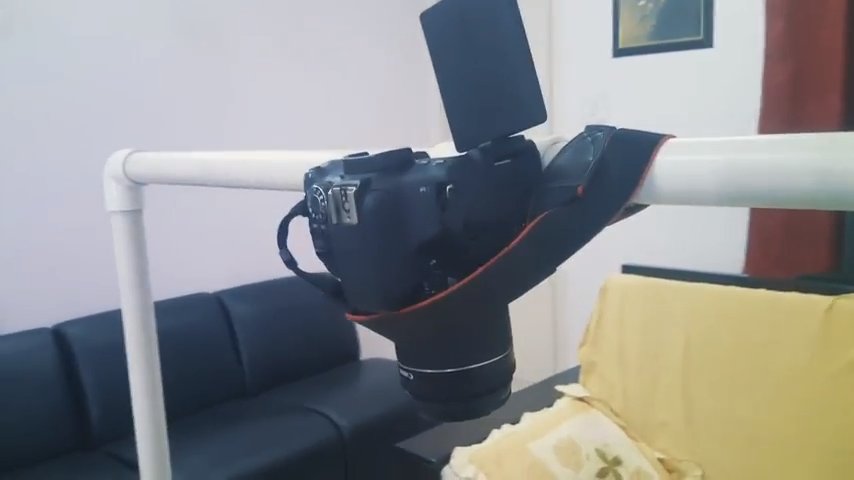
Option 2: DIY Overhead Rig from PVC or Wood
For a more stable, freestanding setup:
- Two vertical pieces of wood or PVC pipe (about 50–60cm tall)
- One horizontal crosspiece
- A phone mount or GorillaPod clamp at the center of the crosspiece
Screw or glue the frame together, position it over your filming surface, and attach your phone at the top. This costs about $15–25 in materials and is much more stable than a clamp arm.
📸 SCREENSHOT NEEDED: DIY overhead video rig made from PVC pipe or wood with phone mounted at the top pointing downward
Lighting for Overhead Videos
Lighting is what separates good overhead videos from great ones:
- Avoid single overhead light: This creates harsh shadows. Use two lights at 45-degree angles from either side of your surface.
- Diffused light is best: Point a lamp at white foam board or a wall and bounce the light onto your subject — this creates soft, even illumination with minimal shadows.
- Consistent color temperature: Mix of natural and artificial light creates color cast. Use all artificial (daylight-temperature LEDs) or all natural (window) — not both together.
📸 SCREENSHOT NEEDED: Overhead filming setup with two desk lamps positioned at 45-degree angles, lighting a flat surface evenly
Quick lighting fix:
A $20 LED ring light placed flat on the table around your subject (or two positioned at 45 degrees) solves most overhead lighting problems instantly and is worth every penny for regular filming.
Camera and Recording Settings
- Lock exposure and focus before recording — tap and hold on your subject in your camera app
- Use 1080p 30fps for most content; 4K if you plan to crop in post
- Turn off auto-rotate and stabilization if it creates wobble
- Use a remote shutter or delayed start to avoid camera shake when pressing record
Editing Overhead Videos
For overhead footage, keep the edit clean:
- Crop out any clamp or arm that appears at the edge
- Color grade for warmth — overhead flat lays look best slightly warm
- Add soft background music that doesn’t compete with the visuals
- Speed ramp routine parts (preparation, cleaning) to keep pace
Quick checklist:
- ✅ Start with a phone clamp arm ($10–15) — cheapest and fastest to set up
- ✅ Use two lights at 45-degree angles for even, shadow-free lighting
- ✅ Lock focus and exposure before hitting record
- ✅ Use rear camera for better image quality
- ✅ Film on a clean, contrasting surface — white foam board or dark mat work well as backgrounds
FAQ
What surface should I film on for overhead videos?
White foam board, marble contact paper, dark felt mat, or kraft paper all work well. The key is that your subject should contrast with the surface — light subjects on dark backgrounds and vice versa.
How do I prevent my shadow from appearing in the shot?
Position your lights to come from the sides or above, not from behind you. Step back from the setup when recording. Using a remote shutter button or hands-free recording eliminates the problem entirely.
Do I need a dedicated camera or does a phone work?
A modern smartphone (iPhone 14+, Pixel 7+, Samsung S-series) produces excellent overhead footage. For most YouTube content, a phone with good lighting beats a mediocre dedicated camera.
Best Free Video Editing Software ↗YouTube Tips for Beginners
The phone clamp arm is the best starting point — you can have your first overhead setup running in 15 minutes. Nail the lighting first (two 45-degree sources), and the footage will look professional regardless of what camera you’re using.
Recommended for you
Video Editing Services
Human-led video editing from ₹399 per finished minute for YouTube, Shorts, talking-head videos, brand films and documentaries.
Our Product